
 Halkali merkez neighborhood fatih st ozgur apt no 46 , Kucukcekmece , Istanbul , 34303 , TR
In this real Ubuntu 24.04.4 LTS VPS test we ran Ollama in Docker, pulled qwen3:4b at roughly 2.5 GB, sent a real /api/chat inference request and kept the Ollama API restricted to 127.0.0.1:11434 instead of exposing it directly to the public Internet.
Ubuntu 24.04.4 LTS
   ↓ Docker / eka-ai
Ollama :11434
   ↓
qwen3:4b
   ↓
Real /api/chat test
   ↓
127.0.0.1 local APIThis guide documents a real Docker-based Ollama deployment on Ubuntu 24.04.4 LTS. The goal is to run qwen3:4b fully on the VPS while keeping the API off the public interfaces.
The final setup attaches Ollama to the eka-ai Docker network, stores models in the persistent ollama_data named volume and exposes the host API only on 127.0.0.1:11434.
Ubuntu 24.04.4 LTS
   ↓
Docker / eka-ai
   ↓
Ollama :11434
   ↓
qwen3:4b
   ↓
127.0.0.1 local API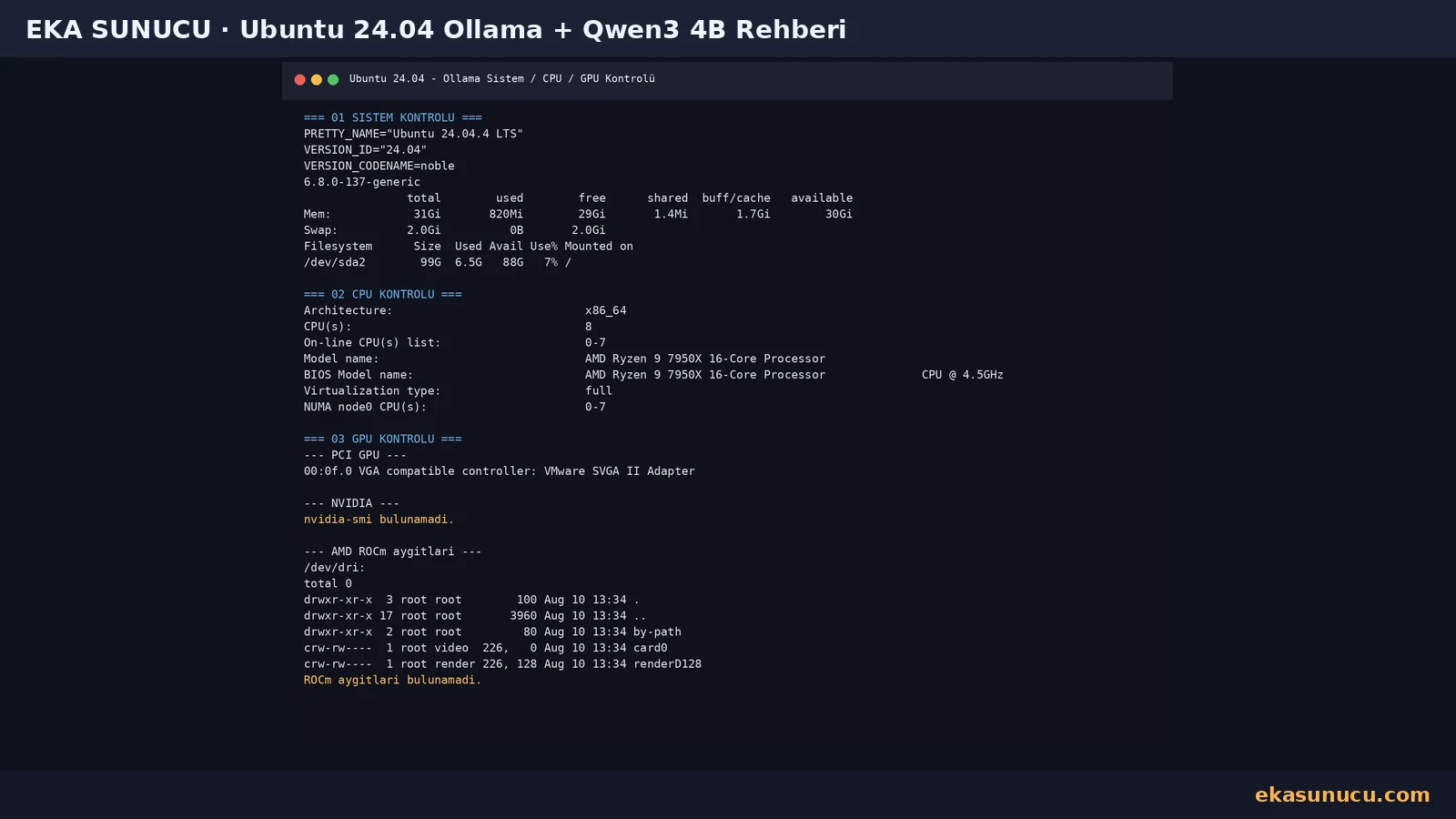
The test VPS ran Ubuntu 24.04.4 LTS with 8 vCPUs and about 31 GiB RAM. The exposed processor was based on AMD Ryzen 9 7950X. No NVIDIA driver or usable ROCm compute device was present, so the first deployment was validated in CPU mode.
Local models consume RAM and disk. Size the server using quantization, context window, concurrent users and operating-system overhead instead of looking only at parameter count.
cat /etc/os-release | grep -E 'PRETTY_NAME|VERSION_ID|VERSION_CODENAME'
uname -r
free -h
df -h /lscpu | grep -E 'Architecture|CPU\(s\)|Model name'
nvidia-smi 2>/dev/null || true
ls -la /dev/dri 2>/dev/null || trueBecause both Ollama and Open WebUI run in Docker, we first verified the Docker daemon and Compose plugin. The real test used Docker Engine 29.7.2 and Docker Compose v5.4.0.
If Docker is not installed yet, complete the Ubuntu 24.04 Docker and Portainer guide first using Docker's official repository.
docker --version
docker compose version
systemctl is-active dockerWe created a dedicated bridge network named eka-ai so Open WebUI can resolve Ollama by container name. A named volume called ollama_data keeps downloaded models independent from the container lifecycle.
Containers can be recreated during upgrades while model data remains in the named volume. Do not remove the volume without a verified backup.
docker network inspect eka-ai >/dev/null 2>&1 || docker network create eka-ai
docker volume create ollama_datadocker network inspect eka-ai --format 'Network={{.Name}} Driver={{.Driver}} Scope={{.Scope}}'
docker volume inspect ollama_data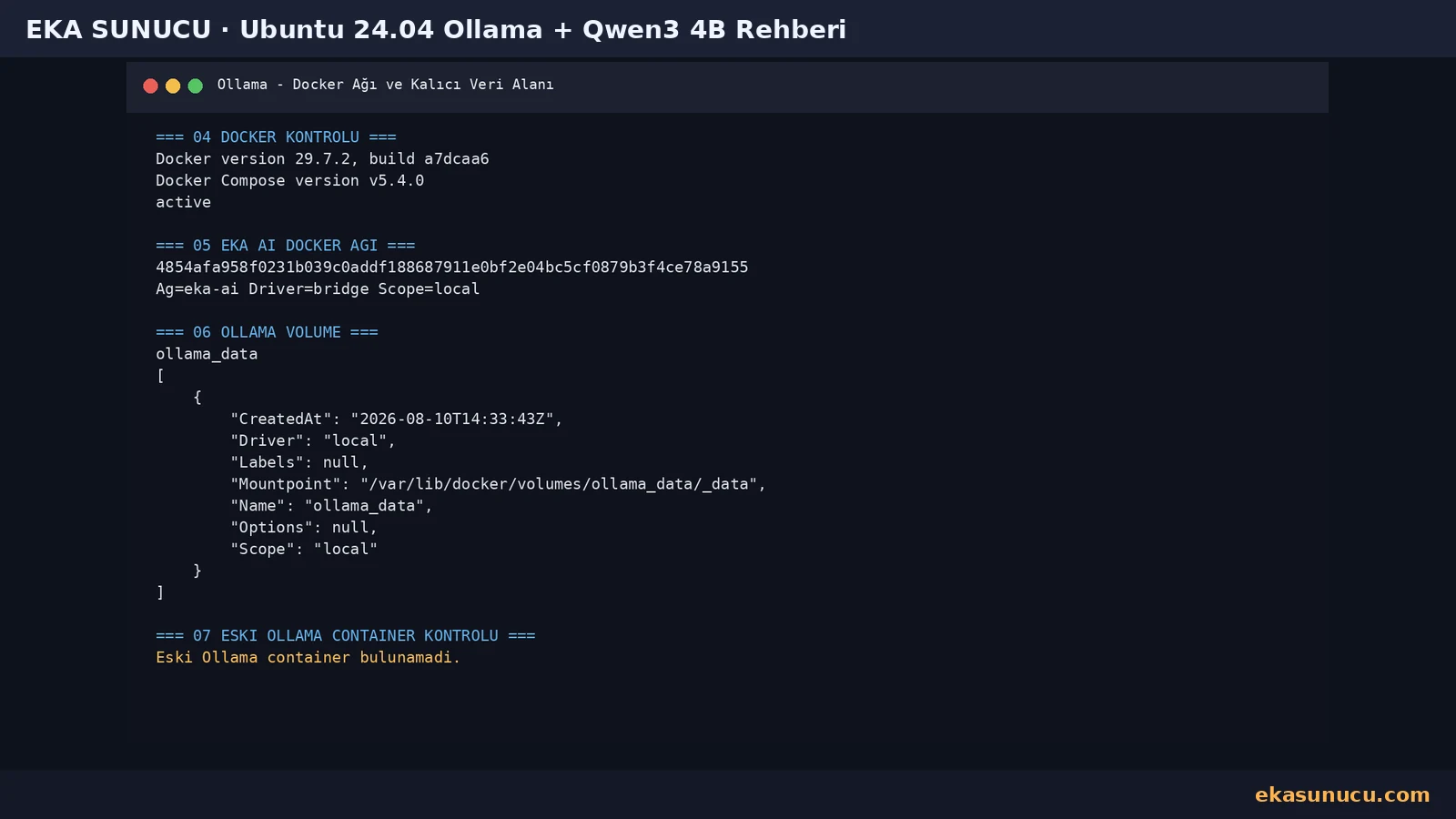
No GPU passthrough was detected in the test, so we ran the official Ollama Docker image in CPU mode. Host port 11434 was published on 127.0.0.1 rather than 0.0.0.0, preventing direct Internet exposure of the Ollama API.
The container also joined eka-ai. Open WebUI can therefore reach it as ollama:11434 without exposing that private service to users.
docker pull ollama/ollama:latestdocker run -d --name ollama --restart unless-stopped --network eka-ai -p 127.0.0.1:11434:11434 -v ollama_data:/root/.ollama ollama/ollama:latestdocker ps --filter name='^/ollama$'
curl -sS http://127.0.0.1:11434/api/tags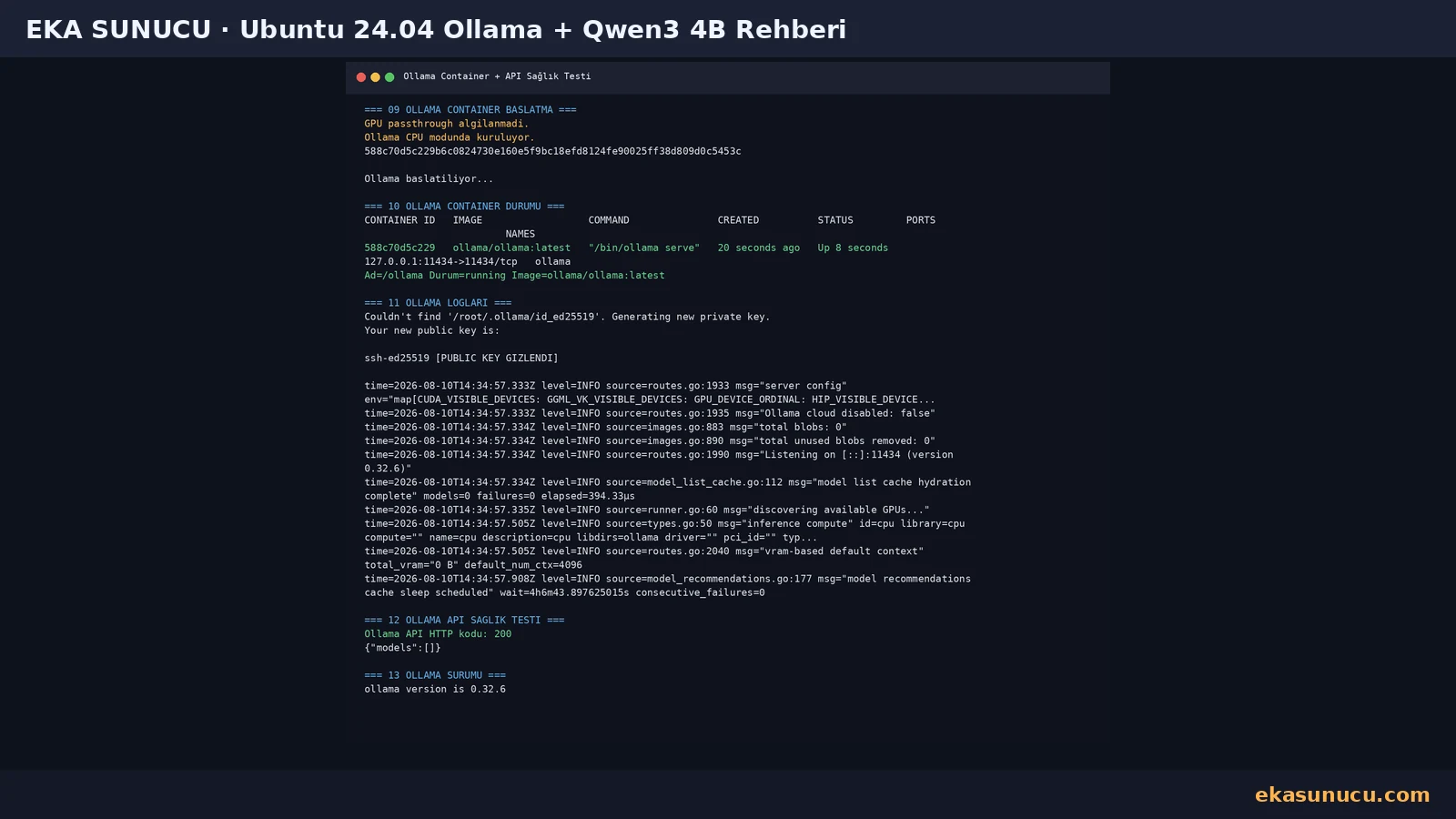
After Ollama became available we pulled qwen3:4b inside the container. In the real API output the model occupied about 2.5 GB and reported parameter_size 4.0B with Q4_K_M quantization.
Download time depends on disk and network performance. Wait for the pull to finish before expecting the model to appear in Open WebUI.
docker exec ollama ollama pull qwen3:4bdocker exec ollama ollama list
curl -sS http://127.0.0.1:11434/api/tags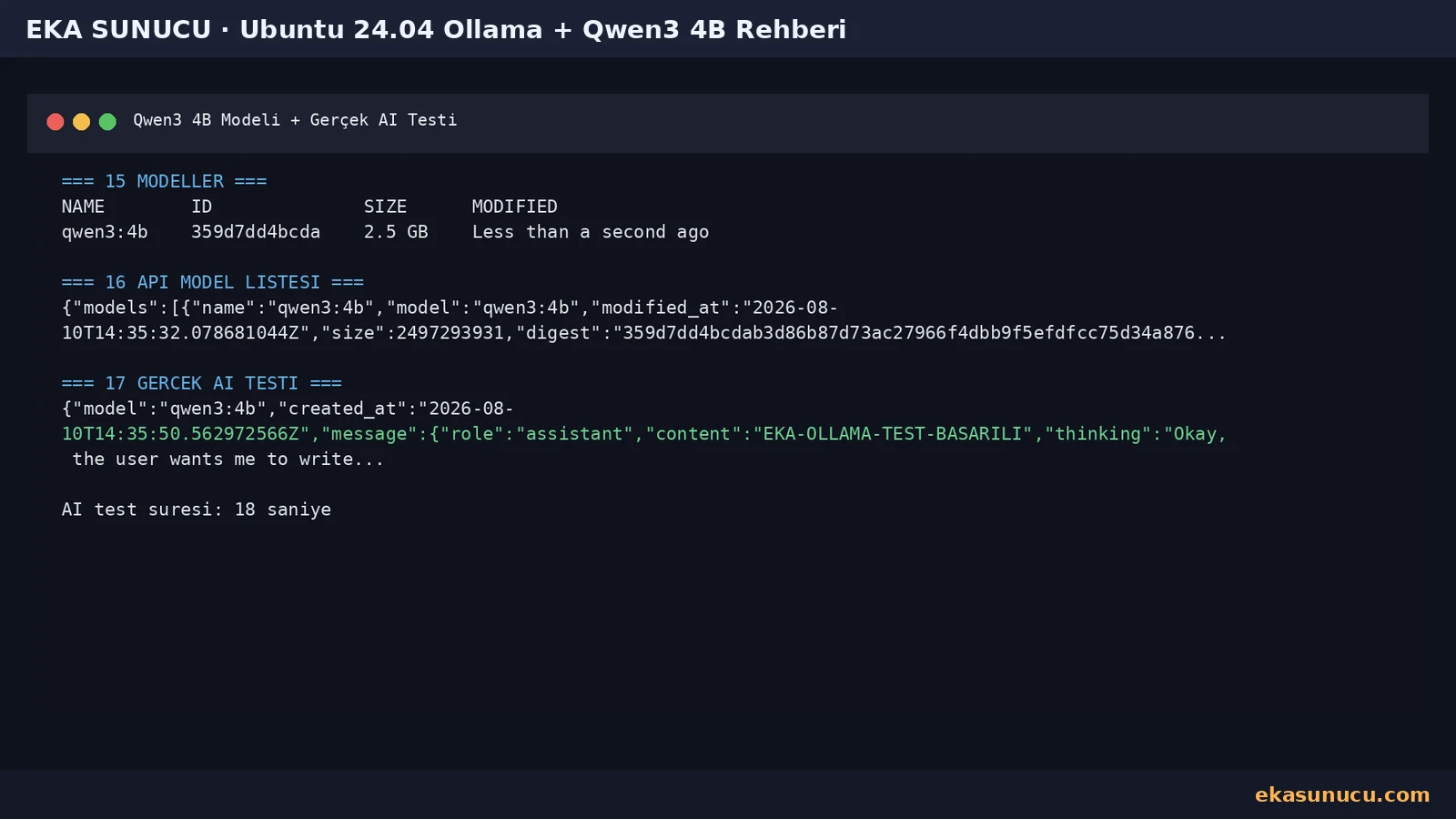
Seeing a model in the inventory does not prove inference works, so we sent a real request to /api/chat and confirmed qwen3:4b returned the expected test phrase.
With the model loaded in our CPU test, Ollama used roughly 3 GiB RAM and ollama ps reported 100% CPU. These figures describe only the captured test moment; longer context and concurrent requests change resource usage.
curl -sS http://127.0.0.1:11434/api/chat -d '{"model":"qwen3:4b","messages":[{"role":"user","content":"Write only EKA-OLLAMA-TEST-BASARILI."}],"stream":false}'docker exec ollama ollama ps
docker stats --no-stream ollama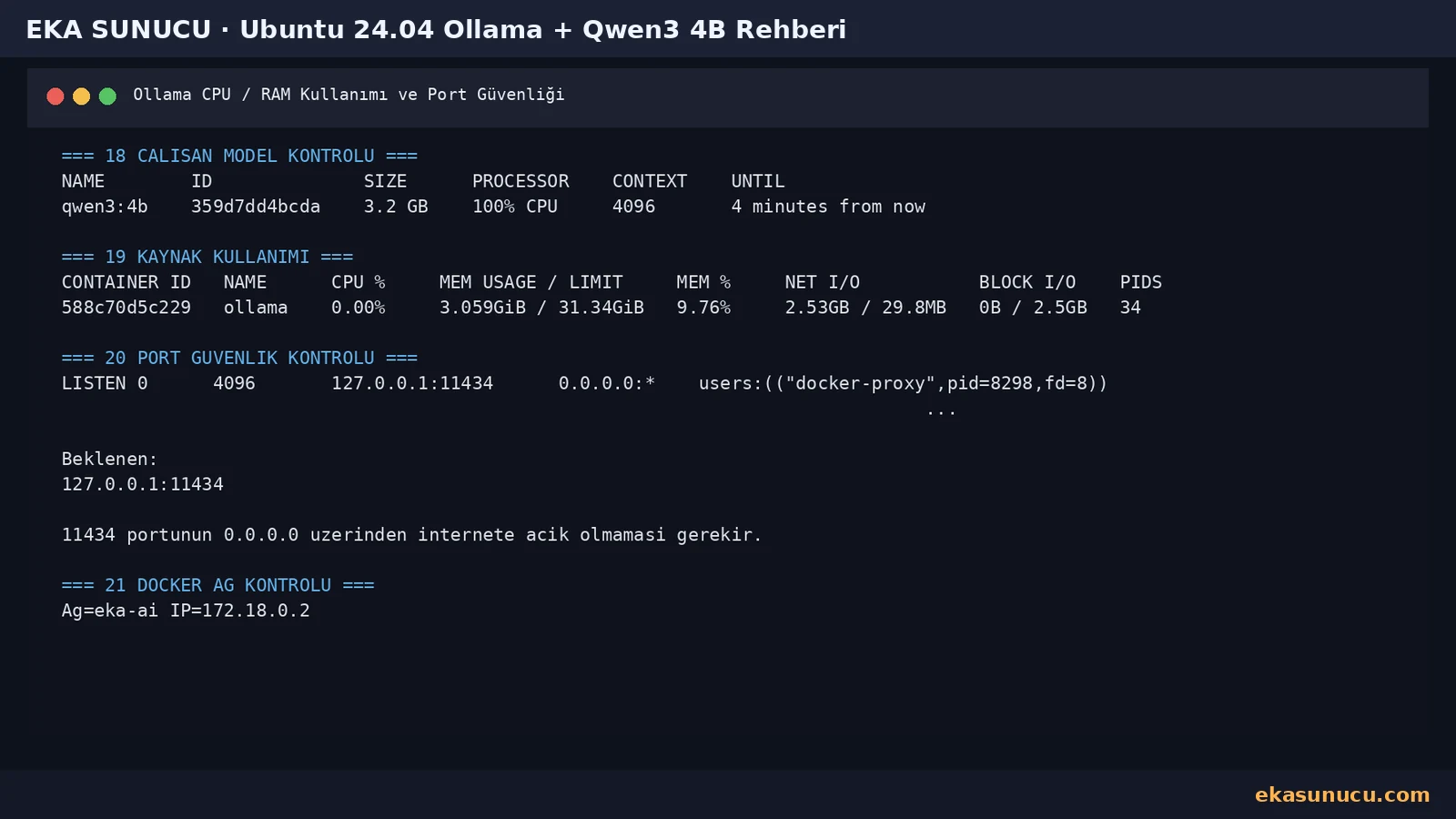
After real inference, qwen3:4b was loaded on CPU and the Ollama container used about 3 GiB of memory in our test. Actual use changes with model, context and concurrency.
The key final check is that port 11434 listens only on 127.0.0.1, preventing the default Ollama API from being published directly on public interfaces.
docker exec ollama ollama ps
docker stats --no-stream ollamass -lntp | grep ':11434'
docker network inspect eka-ai --format '{{range .Containers}}Network={{$.Name}} IP={{.IPv4Address}}{{end}}'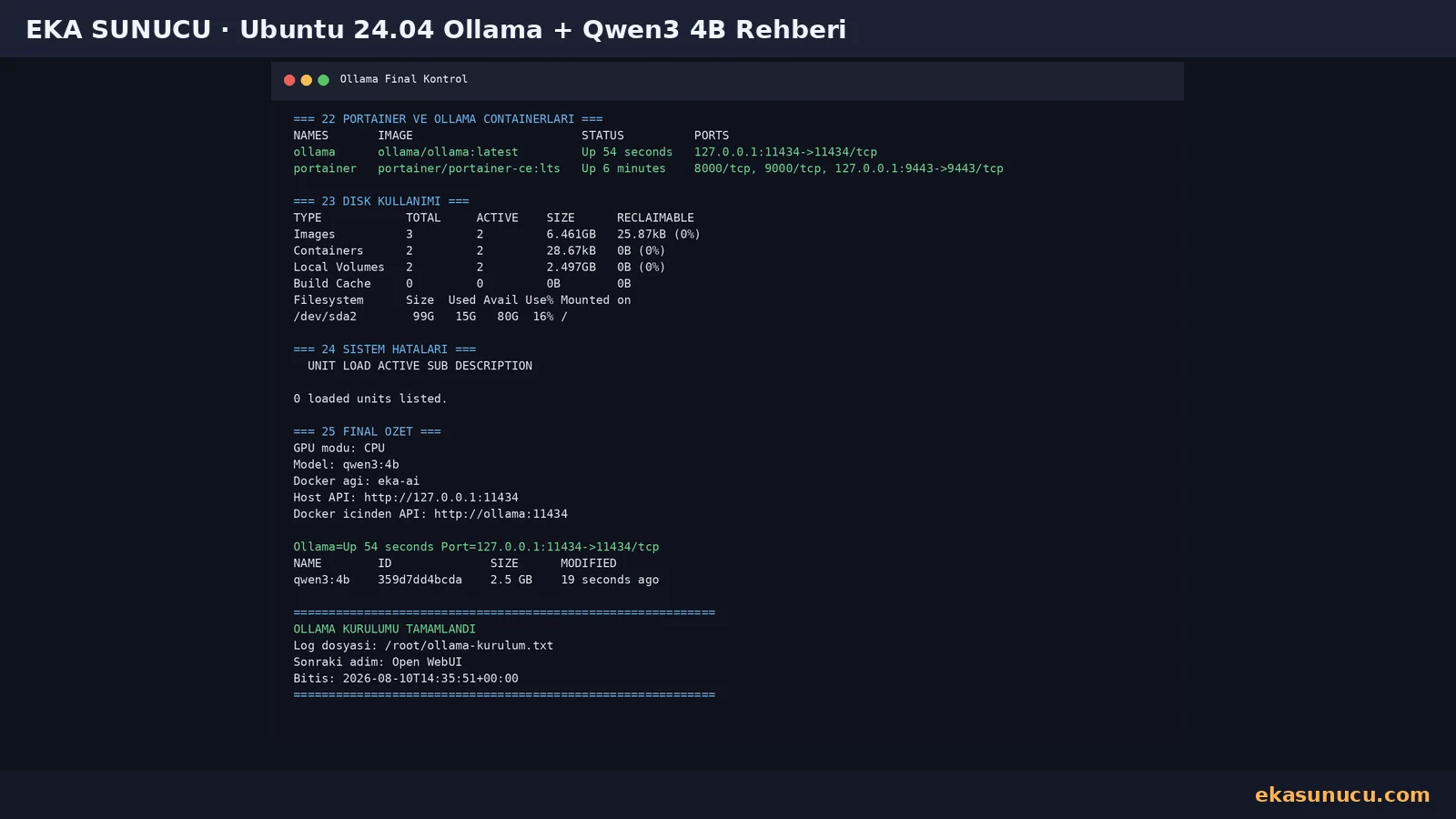
Yes. In this real test Ollama ran on Ubuntu 24.04.4 LTS using the ollama/ollama Docker image.
No. The test VPS had no compute GPU passthrough and qwen3:4b ran in CPU mode.
The real ollama list output showed qwen3:4b at about 2.5 GB.
The real API metadata reported parameter_size 4.0B and Q4_K_M quantization.
The default API port is 11434. This setup binds it only to 127.0.0.1:11434 on the host.
Prefer a private network, authenticated reverse proxy or another access-control layer instead of exposing the default local API directly.
We used docker exec ollama ollama pull qwen3:4b inside the running container.
Use docker exec ollama ollama list or query http://127.0.0.1:11434/api/tags.
A POST request was sent to /api/chat and qwen3:4b returned the expected EKA-OLLAMA-TEST-BASARILI text.
With the model loaded, the tested Ollama container used roughly 3.06 GiB of memory.
Yes if the ollama_data named volume is preserved. Deleting the volume can remove model data.
Put both services on the same user-defined network and use http://ollama:11434.
Yes if your server has enough RAM, disk capacity and preferably an appropriate GPU.
Check port bindings, volume backups, restart policy, resource usage and the API access policy.
Run Qwen3, Ollama, Open WebUI, n8n and other self-hosted AI services on your own EKA Sunucu Linux VPS.
Updated: 10.08.2026 Turkey (Turkish)
 Germany (German)
 Worldwide (English)

