
 Halkali merkez neighborhood fatih st ozgur apt no 46 , Kucukcekmece , Istanbul , 34303 , TR
Eka Plugin Conflict AI automatically detects plugin conflicts on your WordPress site, analyzes error logs and provides AI-powered solution recommendations. 8 AI providers, Safe Mode, WooCommerce monitoring and AES-256 encryption included.
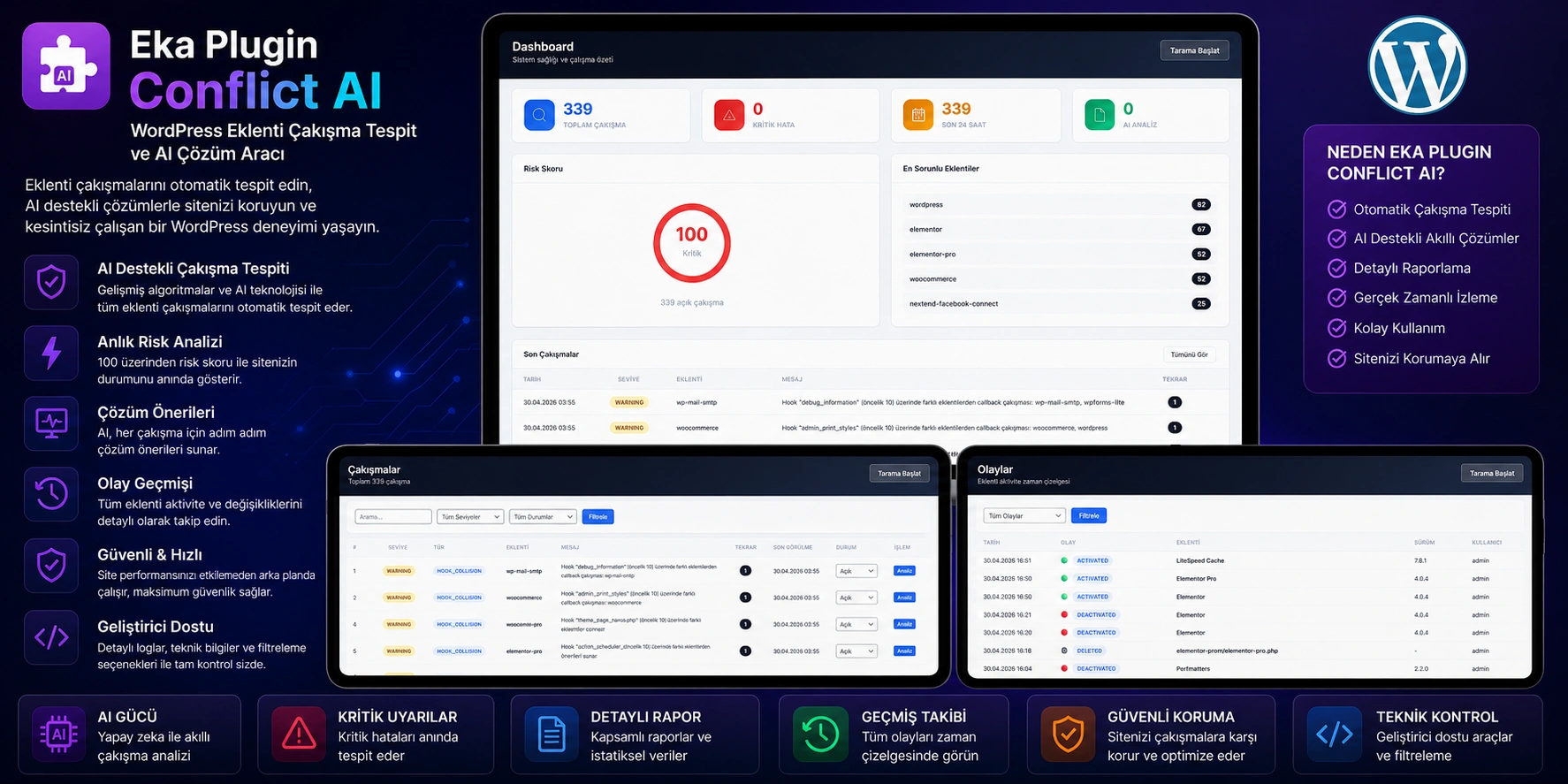
8 smart solution suggestions with different AI providers
Detect the problematic plugin by isolating it
Monitor checkout, payment and cart conflicts
Store API keys securely
Problems experienced on WordPress sites More than 70% caused by plugin conflicts:
8 Risk level, cause, solution and prevention tips with AI provider
Scan debug.log, WooCommerce and custom log files simultaneously
Find the problematic one by isolating plugins one by one
Duplicate callback, priority conflict and Reflection API analysis
Privately monitor checkout, payment and cart hooks
API key, password, IP, email, JWT are automatically masked
Securely store API keys with AES-256-CBC
Save plugin state and restore with one click
Scheduled automatic scanning and cleaning
Hash-based cache — prevent repetitive queries
Track activation, update, deletion events chronologically
Switch to backup provider if default AI does not respond
Any conflicts detected analyzed by artificial intelligence. AI provides you with the possible cause of the error, risk level, affected components, and step-by-step solution instructions. A developer note, customer disclosure text, and prevention tips are also included.
Scans WordPress debug.log, WooCommerce logs and custom log files simultaneously
Fatal error, warning, notice, deprecated, function duplication, class conflict, memory overflow
Prioritizes conflicts by grouping them according to criticality level
WordPress' most powerful troubleshooting tool now at your fingertips with one click. You can find the source of the problem without any data loss or disruption of your site:
Saves the current state of all plugins
Eka Plugin Deactivates all plugins except Conflict AI
Activates plug-ins in order and detects which one is causing the problem.
Restores all plugins to their original state when testing is complete
It performs a deep scan of the WordPress hook system and detects:
Repeated functions registered in more than one priority on the same hook
Conflicting functions binding to the same priority from different plugins
Precisely determines which plugin each callback comes from
3 in checkout hooks. party add density
Number of active payment methods and performance alerts
Conflicts in checkout, cart and order processes
woocommerce_init hook excessive callback detection
Session management conflict analysis
Automatic scanning of WooCommerce log files
Error logs sent to AI sensitive information is automatically masked. Your data is never sent to the AI provider in cleartext:
[API_KEY_MASKED]
[EMAIL_MASKED]
[IP_MASKED]
[DB_MASKED]
[SERVICE_KEY_MASKED]
Replaced with relative path
If your default provider does not respond, automatically switches to backup provider (fallback):
| Provider | Description |
|---|---|
| Google Gemini | Google's artificial intelligence model |
| OpenRouter | 100+ model access |
| Groq | Ultra fast inference |
| NVIDIA Build | NVIDIA GPU supported models |
| Cloudflare Workers AI | Edge computing AI |
| Hugging Face | Open source models |
| Eka AI | Eka's own AI service |
| Z AI | Z AI platform |
Instantly detect post-update conflicts
Quickly resolve payment and checkout issues
Professional troubleshooting at customer sites
Analyze hook conflicts and duplicate callbacks
Ensure stability on sites with multiple plugins
Monitor and manage customer sites from a single center
Select Plugins → Add New → eka-plugin-conflict-ai.zip
Click the Activate Plugin button
AI Providers → select at least one AI provider and enter the API key
Dashboard → Start Full Scan → view conflicts
Current WordPress version recommended
OpenSSL required for AES-256 encryption
Database support
Required for WooCommerce crawling
The most frequently asked questions about Eka Plugin Conflict AI.
8 AI provider, Safe Mode, WooCommerce scanning, hook conflict detection and sensitive data protection — all in one plugin.
Source code included · 6 months free support · Lifetime updates · No subscription
 Turkey (Turkish)
 Germany (German)
 Worldwide (English)

