
 Halkali merkez neighborhood fatih st ozgur apt no 46 , Kucukcekmece , Istanbul , 34303 , TR
Eka Image Optimizer Pro automatically optimizes all images on your WordPress site, converts them to WebP format and serves them with smart lazy-load technology.
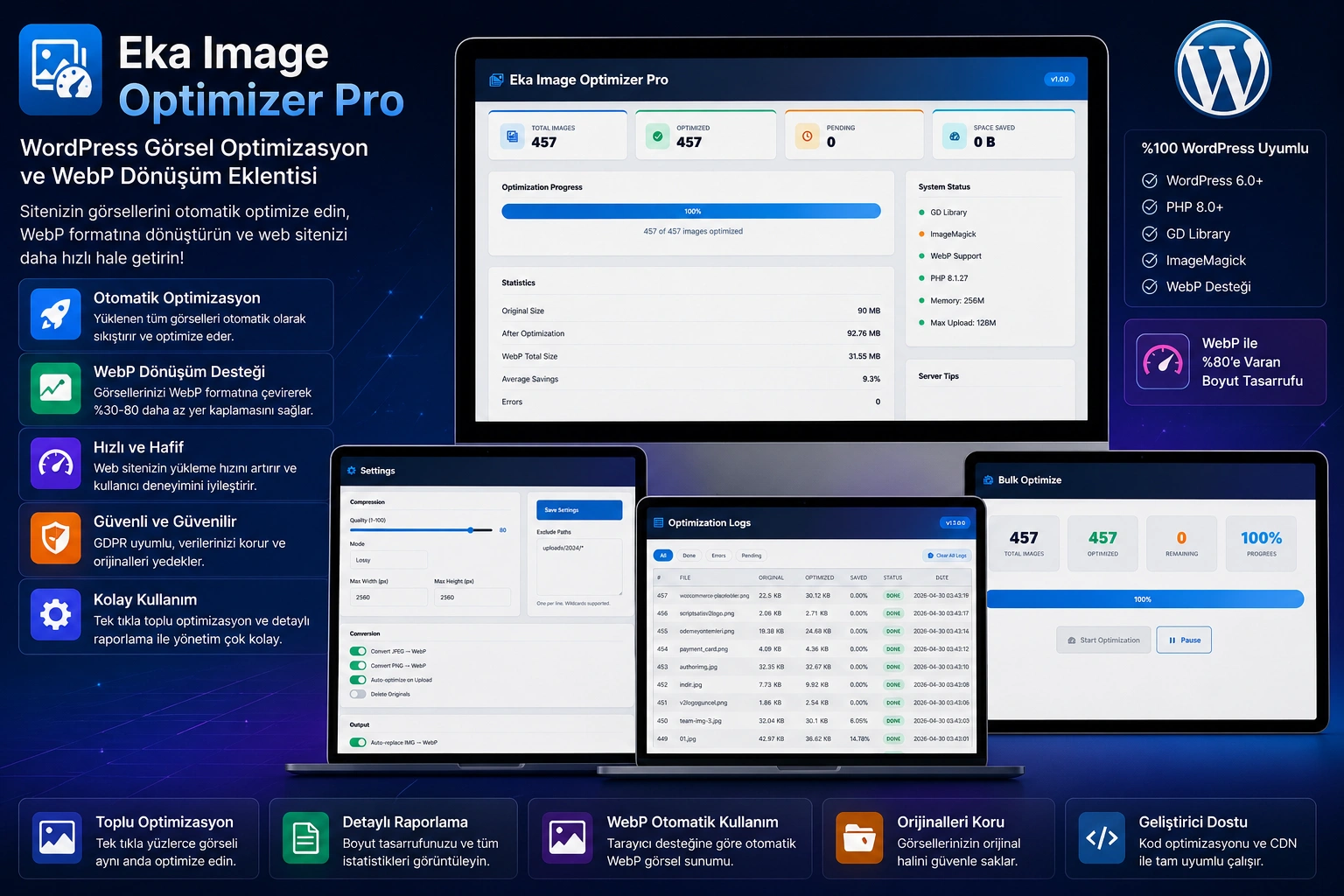
JPEG/PNG → WebP automatic conversion
Lossless and lossy compression
Optimize thousands of images with one click
Native lazy loading and async decoding
Average size of web pages Images more than %50 creates. Unoptimized images:
JPEG/PNG → WebP auto conversion, save25-70 %
Lossless and lossy compression, quality set from 1-100
Automatic reduction of unnecessarily large images to a certain size
automatic insertion of loading="lazy" and decoding="async"
Browser compatible WebP presentation with img → picture fallback
Queue thousands of images with one click and process in the background
Scheduled automatic optimization and orphan removal
wp eka-img optimize, server control with stats commands
Automatic watermark — position, size and opacity adjusted
Total savings, number of optimizers and success rates
Global performance with CDN URL configuration
Keep the original image and restore it at any time
Every JPEG and PNG image uploaded is automatically updated to a new generation. to WebP format is converted. WebP format, same quality %25-70 smaller offers file size. If the browser does not support WebP, the original format is automatically presented (fallback).
All on your page <img> tags automatically <picture> is converted into a tag. You don't need to write extra code.
As soon as the images are uploaded, they are compressed according to the quality setting you specify. With maximum width and height limits, unnecessarily large images are automatically resized. No external API required, all operations occur on your server.
Compression quality from 1-100 —recommended: 75-90
Max. Shrink unnecessarily large files with width/height limit
PHP GD (required) or Imagick (optional, higher quality) support
To the images loading="lazy" and decoding="async" attributes are added. Images below the fold are not downloaded when the page loads; It loads when the user scrolls to that section. Dramatically reduces page load time.
Do you have hundreds or thousands of unoptimized images in your current media library? With one click, you can queue them all and optimize them in the background. The process is followed instantly with the progress bar.
Automatic watermark adding
Position, size and opacity settings
Professional brand protection
wp eka-img optimized — batch optimize
wp eka-img stats — view statistics
Detailed log page and dashboard
| feature | Eka Image Optimizer Pro | Other Plugins |
|---|---|---|
| Processing on the Server | ✅ | ❌ (Most external APIs) |
| Monthly Quota / API Limit | Yok | Var |
| Additional Fee (API) | Yok | Var |
| WebP Conversion | ✅ | ✅ (Some are premium) |
| Automatic Picture Fallback | ✅ | ❌ |
| Native Lazy Load | ✅ | ❌ (Some are add-ons) |
| Batch Optimization | ✅ | ✅ (Quota) |
| WP-CLI Support | ✅ | ❌ |
| Watermark Support | ✅ | ❌ |
| Cron Auto Process | ✅ | ❌ |
| One-Time Payment | ✅ | ❌ (Annual subscription) |
Increase page speed by automatically optimizing images in articles
Fast loading store pages with product images
Professional delivery with mass optimization on customer sites
Watermark and CDN integration for brand images
Automated workflows with WP-CLI and cron
Speed and performance improvement on customer sites
Select Plugins → Add New → eka-image-optimizer-pro.zip
Click the Activate Plugin button
Quality: 82, WebP: active, Lazy Load: active, Cron: on
Optimize existing images from the Bulk Optimize page
Current version recommended
WebP support must be active. Imagick optional
Database support
More than ~%20 of current media size is recommended
The most frequently asked questions about Eka Image Optimizer Pro.
WebP conversion, smart compression, lazy load, watermark and WP-CLI — no external API required, no monthly quotas.
Source code included · 6 months free support · Lifetime updates · No subscription
 Turkey (Turkish)
 Germany (German)
 Worldwide (English)

