
 Halkali merkez neighborhood fatih st ozgur apt no 46 , Kucukcekmece , Istanbul , 34303 , TR
Eka Sunucu ssl certificate guide Make your website more secure with . This comprehensive guide takes you step by step to learn what SSL certificates are, how they work, and how to install them on your website.
SSL certificates; data encryption, authentication and secure communication They are digital certificates that increase the security of the connection between your website and your visitors.
Provides secure communication by encrypting transmitted data
Verifies that the website belongs to its real owner
Google prioritizes sites with HTTPS in its rankings
It is an indicator of reliability for visitors
SSL (Secure Socket Layer) and the newer TLS (Transport Layer Security) are security protocols that encrypt data transfer between your website and your visitors. Digital documents used to implement these protocols SSL certificates It is called.
SSL/TLS certificates are used for two main purposes:
By encrypting the data sent between the user's browser and the web server (user name, password, credit card information, etc.), it prevents unauthorized persons from accessing this information.
It verifies that the website actually belongs to the specified organization. This allows users to feel confident that they are interacting with a trustworthy site.
SSL certificates are signed by trusted third-party organizations known as "Certificate Authorities" (CA). This way, crawlers can verify the trustworthiness of a website.
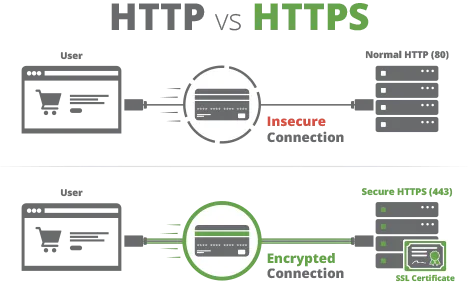
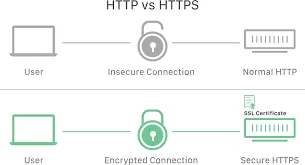
The operation of the SSL/TLS protocol is a complex process that takes place between the browser and the web server. This process is known as "SSL Handshake" and enables the secure exchange of encryption keys.
When the user browser (client) wants to connect to the web server, it sends a "Client Hello" message with information about the encryption algorithms and TLS version it supports.
The server responds with a "Server Hello" message and selects the encryption algorithm to use. Then, SSL certificate sends it to the client. This certificate includes:
The browser verifies the certificate it receives:
The browser generates a random "pre-master private key" and encrypts it with the server's public key. This encryption can only be decrypted with the server's private key. The browser sends this encrypted key to the server.
The server decrypts the encrypted key it receives with its own private key. Now both the browser and the server know the same "pre-master secret key". Using this key, "session keys" valid for that session are generated.
Once the handshake is completed, all data communication between the browser and the server is encrypted and decrypted using the generated session keys. Symmetric encryption is used at this stage because it is faster than asymmetric encryption.
There are different types of SSL certificates you can choose depending on your website's needs and budget. Each provides different levels of security and authentication. To choose the SSL certificate that best suits your needs, you must first evaluate the purpose and operation of your website.
Verification Level: low
Verification Time: Minutes/Hours
Cost: $ (Most economical option)
Suitable Sites: Personal blogs, small corporate sites, sites that do not collect sensitive information
Domain Validated (DV) SSL certificates only verify domain ownership. Verification is usually done by email confirmation or adding a DNS record. These types of certificates are the fastest and most economical SSL certificates.
Verification Level: Orta
Verification Time: 1-3 Day
Cost: $$ (Mid-range cost)
Suitable Sites: Corporate sites, platforms requiring membership, small-medium sized e-commerce sites
Organization Validated (OV) SSL certificates verify the existence and legitimacy of the organization as well as domain name ownership. The certificate authority checks institution information through telephone, address and legal records. This gives users a greater sense of security and reliability.
Verification Level: high
Verification Time: 5-7 Day
Cost: $$$ (High cost)
Suitable Sites: Banks, e-commerce sites, financial institutions, healthcare, large companies
Extended Validation (EV) SSL certificates offer the highest level of security and verification standard. The certificate authority comprehensively verifies the legal existence, physical and operational existence of the institution. Provides maximum reliability for users.
Verification Level: Depends on verification type (DV, OV)
Subdomain Support: Unlimited (for a single level)
Cost: $$ - $$$ (Higher than standard certificates)
Suitable Sites: Sites that use multiple subdomains (e.g. blog.site.com, shop.site.com)
Wildcard SSL certificates provide security for the main domain and an unlimited number of first-level subdomains. With a single certificate, you can protect all subdomains (blog.example.com, shop.example.com, mail.example.com, etc.) in a structure such as *.example.com.
| feature | Domain Validated (DV) | Organization Validated (OV) | Extended Validation (EV) | Wildcard SSL |
|---|---|---|---|---|
| Verification Level | low | Orta | high | Varies depending on type |
| Verification Time | Minutes-Hours | 1-3 Day | 5-7 Day | Varies depending on type |
| Cost | $/Free | $$ | $$$ | $$ - $$$ |
| Subdomain Support | A single domain name | A single domain name | A single domain name | Unlimited (single level) |
| Browser Display | Lock Icon | Lock Icon | Lock Icon (Formerly Green Bar) | Lock Icon |
| Ideal Use | Personal blogs, information sites | Corporate sites, membership sites | E-commerce, banking, health | Sites with multiple subdomains |
SSL certificate installation includes the steps necessary to increase the security of your website. These steps will help you understand how to obtain and install an SSL certificate.
To determine your website's need for an SSL certificate, you need to evaluate your needs and budget. When choosing the type of SSL certificate it is important to consider the purpose and operation of your website.
To obtain an SSL certificate, you may first need to contact a certificate authority (CA). This will help you determine how to obtain an SSL certificate and which type will be appropriate.
To install the SSL certificate, you may need to upload the certificate file to the web server and make the necessary settings for the certificate. This usually requires the support team of your web server provider or SSL certificate provider to assist you.
Once you have completed the installation of the SSL certificate, you can use many tools and methods to test the security of your website. This helps you check whether the SSL certificate is working properly and increasing the security of your website.
The SSL certificate renewal process includes events that cause the SSL certificate to expire or be revoked. This process includes the steps required to re-obtain and install the SSL certificate.
When the SSL certificate expires, your website's security is compromised. This is a necessary step to re-obtain and install the SSL certificate.
Revocation of an SSL certificate is usually done by the certificate authority. This is typically determined by the certificate authority or upon receipt of a notification indicating suspicious activity or breach.
To re-obtain the SSL certificate, you may need to obtain a new certificate and upload it to the web server. This is usually done by the certificate authority or your SSL certificate provider.
Installing an SSL certificate is the same as installing an SSL certificate. Installing an SSL certificate involves uploading the certificate file to the web server and making the necessary settings for the certificate.

It is important that you understand some common errors that may be encountered when installing and using an SSL certificate and how to resolve these errors.
When the SSL certificate expires, your website's security is compromised. This is a necessary step to re-obtain and install the SSL certificate.
Revocation of an SSL certificate is usually done by the certificate authority. This is typically determined by the certificate authority or upon receipt of a notification indicating suspicious activity or breach.
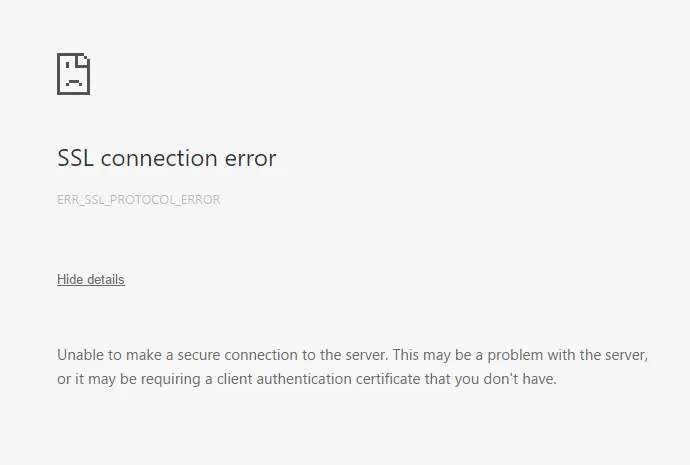
Failure to install an SSL certificate is usually caused by an error occurring at one of the stages of installing the SSL certificate. Resolving these errors involves repeating the installation of the SSL certificate.
An SSL certificate is a digital certificate that encrypts data communication between your website and visitors' browsers. This encryption prevents sensitive information (credit card numbers, personal information, login information, etc.) from being intercepted by third parties. An SSL certificate increases the security and reliability of your website, allows you to rank higher in search engines such as Google, and helps you gain user trust.
To choose the SSL certificate that best suits your needs, you need to evaluate the purpose and operation of your website:
SSL certificates are typically valid for 1-2 years. It is important that you renew the certificate before its expiration date. The renewal process usually starts with reminder emails from your certificate provider. The renewal process includes steps such as creating a new certificate and uploading it to your web server. Most certificate authorities recommend that you start the renewal process 30 days before your certificate expires.
Yes, free SSL certificates like Let's Encrypt are secure and provide adequate protection for basic web security. These certificates are in the Domain Validated (DV) SSL category and offer the same level of security as paid SSL certificates in terms of data encryption. However, these certificates are generally valid for a shorter period of time (90 days) and require more frequent renewal. Additionally, they do not offer additional features such as enterprise authentication or extended verification. OV or EV SSL certificates should be preferred for e-commerce or financial service sites that require a high level of security.
This issue is often caused by a condition known as "mixed content". Among the pages on your site served via the HTTPS protocol, there may be elements such as images, CSS, and JavaScript loaded via the HTTP protocol. To solve this problem:
With modern SSL/TLS protocols and up-to-date server configurations, using an SSL certificate has minimal impact on your website's performance. In fact, the HTTP/2 protocol only works over HTTPS, which provides faster connections than HTTP/1.1. Additional performance improvements for websites using SSL certificates include:
Thanks to these optimizations, your SSL-protected website may even run faster than an unprotected site.
 Turkey (Turkish)
 Germany (German)
 Worldwide (English)

