Turkey (Turkish)
 Germany (German)
 Worldwide (English)


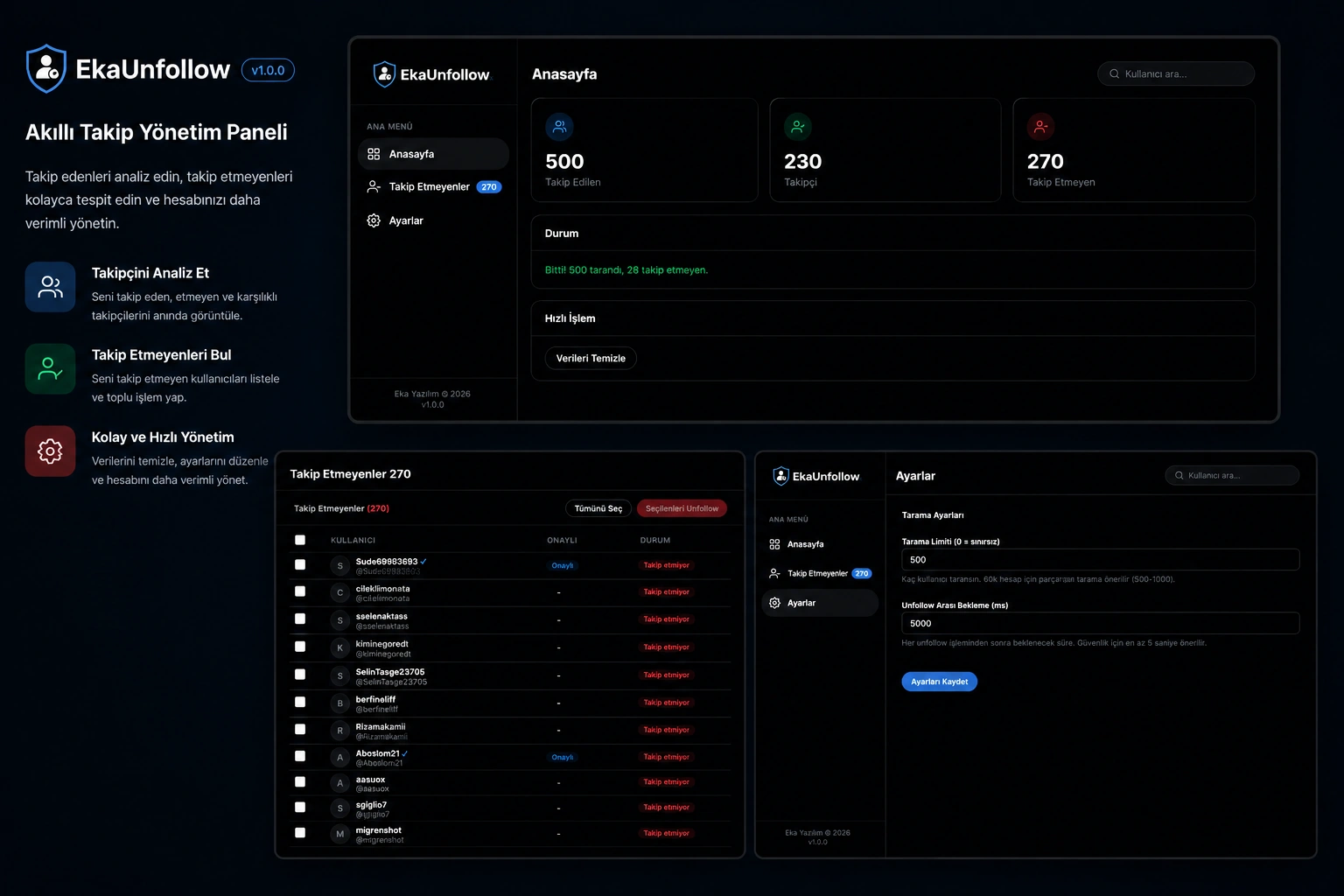
- Manage Your Twitter/X Account Professionally
- You follow thousands of people, but how many of them follow you back? With EkaUnfollow, learning this now takes seconds. Instantly identify accounts that do not follow you and unfollow the ones you choose with a single click.
- Smart Scanning Technology
- EkaUnfollow runs on Twitter/X's own page. It automatically checks the "Following you" badge next to each user you follow. Those who do not have a badge are immediately identified and listed.
- Since it does not use an external API, the security of your account is not at risk. You don't enter your password or API key anywhere.
- ⚡ Real Bulk Unfollow — Not a Simulation
- Many tools on the market only show lists and expect you to unfollow. EkaUnfollow is different. It unfollows the users you choose, sequentially, with real clicks.
- Moreover, it does this directly through your follow list, without opening profile pages one by one. In this way, you will not be stuck with Twitter's daily profile viewing limit.
- ️ Account Security is in the foreground
- Twitter may temporarily restrict your account for transactions made too quickly. EkaUnfollow knows this and adds adjustable random delays between each unfollow action.
- The default wait time is 5 seconds and you can increase or decrease it as per your need. Your account remains safe.
- Professional Administration Panel
- Follow all data with a modern and easy-to-use dashboard:
- Homepage: See the number of followed, followers and unfollowers at a glance
- Non-Followers: List of all accounts that have not followed you back — with verified account badge, username, and profile link
- Settings: Customize crawl limit and unfollow wait time
- You Have Full Control
- Selective unfollow: Select only the accounts you want, leave the rest unfollow
- Select all: Select the entire list with one click
- Stop/Resume: Stop crawling or unfollowing at any time, data will not be lost
- Persistent data: Collected data is stored in Chrome even if the page is closed
- Privacy and Security
- Your data is stored entirely locally in your browser
- No data is sent to any server
- No password or API key required
- Open source — you can review the code anytime
- Who is it suitable for?
| Area of Use | Description |
|---|---|
| Influencers and Content Creators | Optimize your follower/following ratio, make your account look professional |
| Brands and Companies | Keep your corporate account's follow list organized |
| Social Media Managers | Manage your customers' accounts efficiently |
| Digital Marketers | Clean your follow list to increase engagement rate |
| Individual Users | Create a healthier follow list by clearing accounts that do not follow you |
- ✅ Why EkaUnfollow?
| Feature | EkaUnfollow | Other Tools |
|---|---|---|
| No API key required | ✅ | ❌ |
| Profiling limit risk | None | Yes |
| True batch unfollow | ✅ | ❌ |
| Data security (local) | ✅ | ❌ |
| Adjustable speed | ✅ | ❌ |
| Stop/Resume | ✅ | ❌ |
| Free updates | ✅ | ❌ |
| Turkish interface | ✅ | ❌ |
- ❓ Frequently Asked Questions
- Will my Twitter account be compromised? No. EkaUnfollow runs on Twitter's own interface and enforces safe waiting periods between each action. Your account will not be at any risk.
- Do I need to enter an API key or password? No. EkaUnfollow does not require any password, API key or third party login information. It runs directly on the Twitter page in your browser.
- Where is my data saved? All data is stored in Chrome's local storage (chrome.storage.local). No data is sent to any external server. Your data remains entirely yours.
- How many people can it scan? Unlimited. However, for very large accounts (60,000+ followers), granular scanning is recommended. You can set the scanning limit as 500-1000 in the Settings section and scan gradually.
- Is the unfollow process real or a simulation? It is completely real. The plugin does the actual unfollowing by clicking the "Following" button on the Twitter page and accepting the confirmation dialog.
- Can I use my computer while browsing? Yes, but you shouldn't close the Twitter tab. You can continue working in other tabs.
- Which browsers does it work in? Works in Google Chrome and Chromium-based browsers (Brave, Edge, Opera).
- Are the updates free? Yes. All post-purchase updates are free.