 Turkey (Turkish)
 Germany (German)
 Worldwide (English)


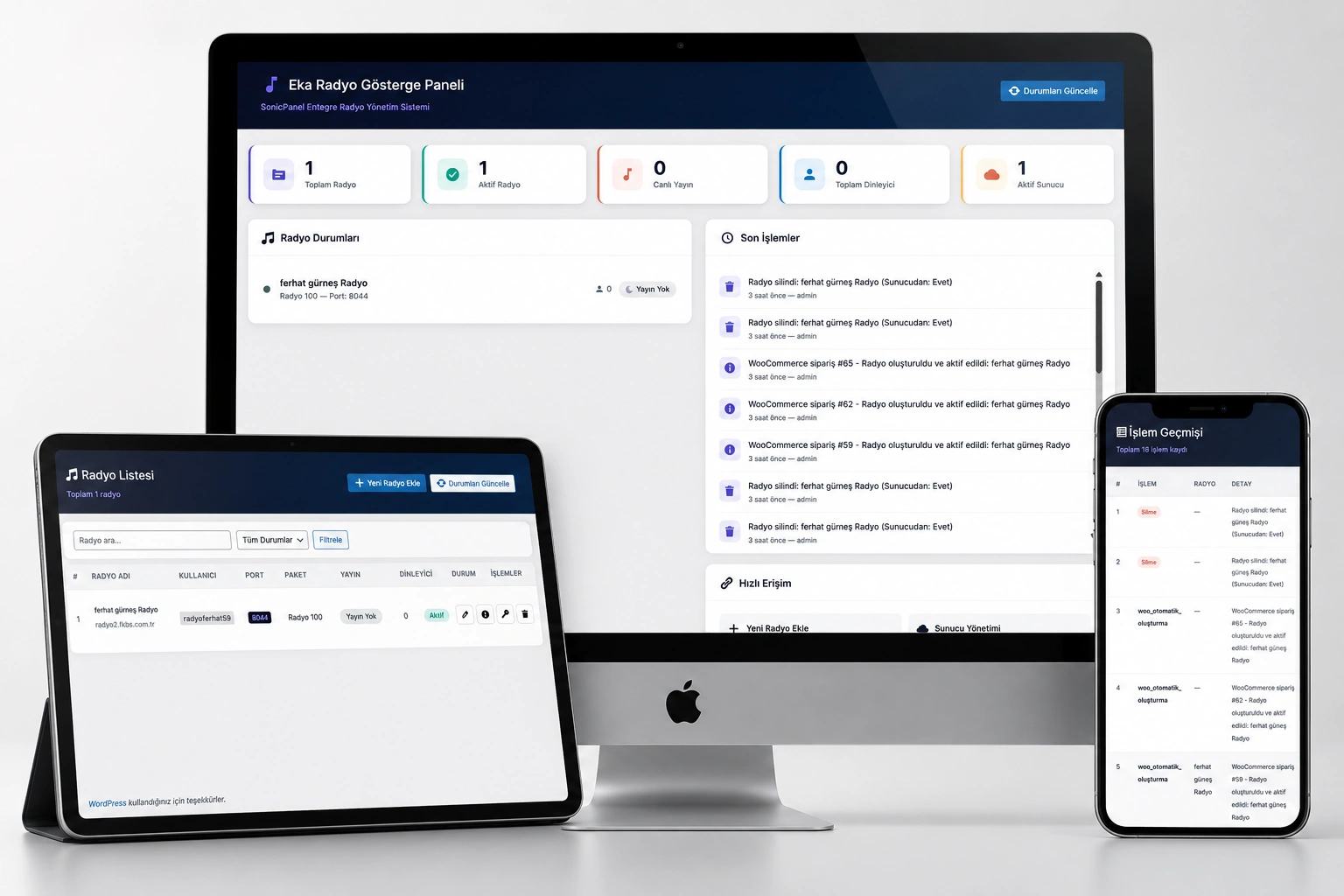
- ️ Eka Radyo — Manage Your Online Radio Business Completely Automatically with WordPress
- Eka Radyo is a professional WordPress plugin developed for radio hosting companies, web radio stations and online broadcasters using the SonicPanel infrastructure. It allows you to manage all processes from radio creation to customer management, from live broadcast listening to automatic sales, from a single panel.
- Stop wasting time with manual operations. When the order arrives, the radio will be created automatically and your customer will start broadcasting immediately.
- Key Features
- SonicPanel API Full Integration
- Perform all operations on your SonicPanel server without leaving your WordPress admin panel. Radio creation, package change, password reset, suspension and deletion operations all work automatically via the API. You do not need to log in to the server panel.
- WooCommerce Automated Sales System
- Define your radio packages as WooCommerce products. When the customer places an order, the radio account isautomatically created and activated. Package selection, server assignment and pricing are entirely managed from product settings. A welcome e-mail is automatically sent to the customer.
- Customer Self-Service Panel
- Your customers can view their radios from the WordPress "My Account" page. They access all information such as username, panel password, port, package information, broadcast URL and account status with a single click. Reduce support requests, increase customer satisfaction.
- Professional Live Broadcast Player
- Offer your visitors a modern and stylish listening experience. Player; It comes with 3 different themes: dark, light and glass (glassmorphism). It provides a professional look with real-time song information, listener count, volume control and wave animation. It can be easily added to any page with a shortcode.
- Real-Time Monitoring Panel
- Instantly follow the total number of radio stations, number of active radio stations, live broadcast status, number of instant listeners and server statistics from the dashboard. Query the broadcast status of all radios with a single click with the "Update Status" button.
- ️ Multiple Server Support
- Add multiple SonicPanel servers to the system and manage each independently. You can define separate API key, domain and port information for each server. Instantly verify server health with connection testing.
- Bulk Import
- Importing radios from your existing SonicPanel server to WordPress takes seconds. Include hundreds of radios in the system at once with single form or CSV bulk transfer.
- Detailed Transaction Logs
- All operations such as radio creation, deletion, package change, password reset are recorded with date, user and detail information. Access evidentiary reports on security audits and customer objections.
- Shortcode and Widget Support
- Easily add the radio player, radio list or individual radio card to your pages, posts and sidebar with shortcode and widget:
[eka_radyo_player id="1" theme="dark"]— Single radio player[eka_radyo_listesi theme="dark" column="3"]— Radio list grid view[eka_radyo_kart id="1" theme="cam"]— Single radio card- Modern and Responsive Design
- The admin panel offers a professional look with a dark theme. Frontend players work flawlessly on all devices (desktop, tablet, mobile). It is fully responsive and compatible with the CSS Grid infrastructure.
- Who is it suitable for?
| Area of Use | Description |
|---|---|
| Radio Hosting Companies | If you sell radio hosting through SonicPanel, completely automate your order → creation → invoicing process. |
| Web Radio Stations | Integrate your own radio into your WordPress site; Let visitors listen directly from your site, track your listener count. |
| Radio Networks | Manage multiple radio stations from a single panel, list all channels in grid view. |
| Podcast and Music Platforms | Embed live broadcast streams on your site with professional players; Strengthen your brand image. |
| Freelancer and Agencies | Offer a turnkey radio solution to your customers; Complete the installation in minutes. |
- ❓ Frequently Asked Questions (FAQ)
- Q: Can I use this plugin if I do not have a SonicPanel license? A: The plugin is designed to work with the SonicPanel API. You need an active SonicPanel server for radio creation and management features. Only frontend player (shortcode/widget) does not require SonicPanel; You can enter the broadcast URL manually.
- Q: Is WooCommerce mandatory? A: No. Even without WooCommerce, you can create and manage radios and use front-end players from the admin panel. WooCommerce is only required for auto-selling and customer self-service panel features.
- Q: How many radios and servers can I add? A: There is no limit. You can add as many SonicPanel servers as you want and create an unlimited number of radios.
- Q: Are SHOUTcast and Icecast supported? A: Yes. SonicPanel supports both SHOUTcast and Icecast infrastructure. The plugin manages both systems smoothly and automatically detects broadcast status.
- Q: Can customers manage their own radios? A: Customers can view radio information (username, password, port, broadcast URL) from the "My Account > My Radios" page. Radio management (creation, deletion, suspension) can only be done by users with admin privilege.
- Q: Are plug-in updates automatic? A: Plug-in updates are provided through the platform you purchased it from. New features, security patches and compatibility improvements come with each update.
- Q: Can I transfer my existing radios to this system? A: Yes. With the "Import" module, you can import your existing radios into the system one by one or collectively with a CSV file. Existing radios are not affected during the transfer.
- Q: Is there multi-language support? A: The plugin was developed in Turkish and is compatible with the WordPress translation engine (.po/.mo). It can be translated into different languages if necessary.
- Q: Do you offer technical support? A: Yes. Post-purchase installation support, configuration assistance and technical support are provided by us.
- Q: Does the plugin affect the speed of my site? A: No. The plugin loads CSS and JS files only when needed. It uses lightweight AJAX calls in the admin panel. The frontend player runs completely asynchronously and does not affect page load time.


