 Turkey (Turkish)
 Germany (German)
 Worldwide (English)


Step-by-step booking
Google Maps distance and duration, vehicle selection, extras and coupon are collected in one form.

 Halkali merkez neighborhood fatih st ozgur apt no 46 , Kucukcekmece , Istanbul , 34303 , TR
Google Maps distance calculation, dynamic pricing, coupons, PayTR/Iyzico/Stripe payments, customer panel, RBAC, multi-currency and multi-language — a ready infrastructure for your transfer company.
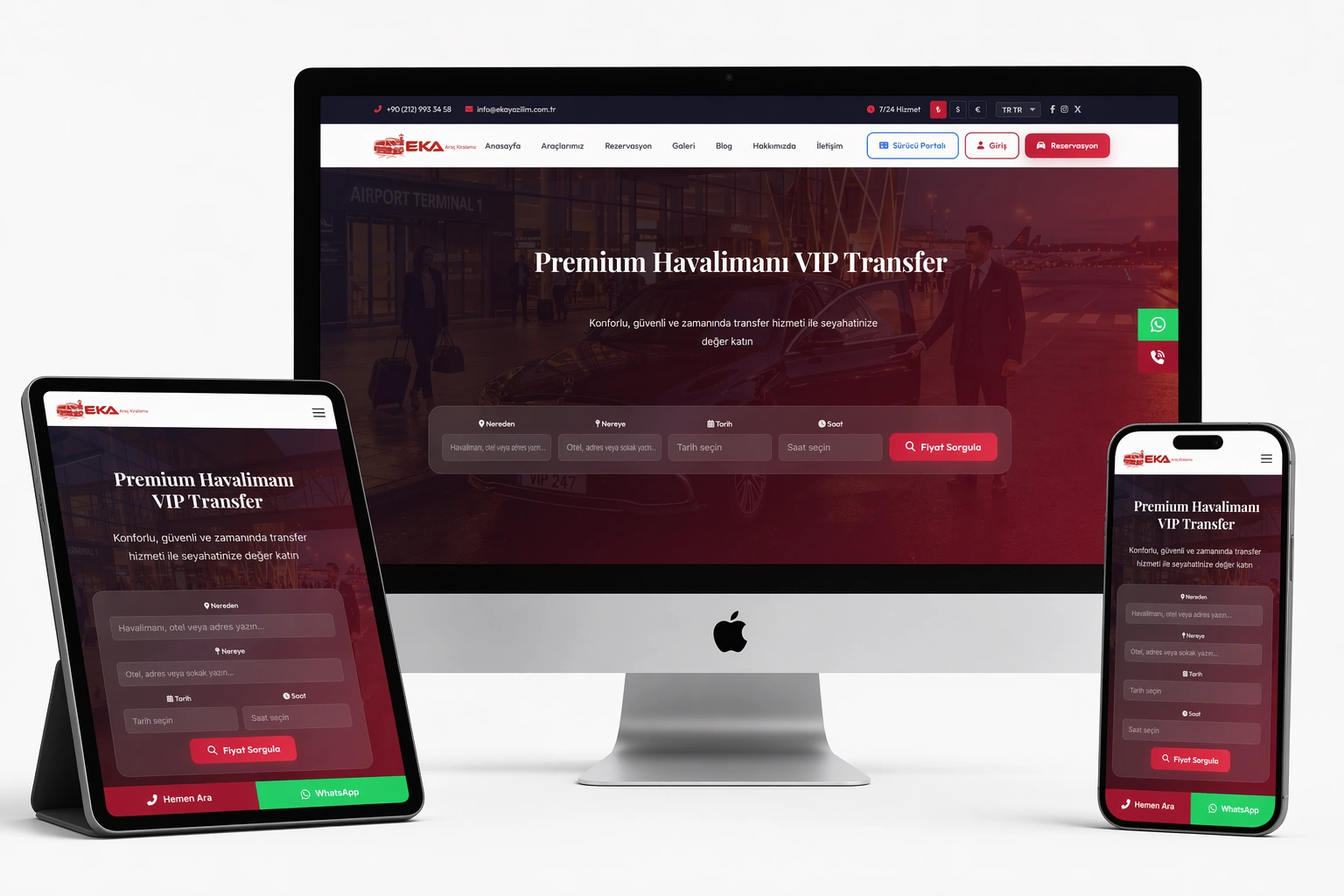
The Airport Transfer and Car Rental Software brings together the storefront where customers book online, the driver and vehicle fleet, dynamic pricing and the admin panel in one PHP stack. It is prepared end-to-end for airport transfers, VIP transportation, rent a car and tour operators.
Google Maps distance and duration, vehicle selection, extras and coupon are collected in one form.
Reservations, vehicles, regions, customers, payments and reports are managed from one panel.
TRY, USD and EUR are converted automatically via the TCMB exchange rate service.
Navy corporate design, role-based authorization and full activity logging.
The system connects the steps where the visitor starts the booking, selects the vehicle and extras, completes payment and the operation runs with automated notifications.
The customer enters from/to, date, passenger count and flight info; the system calculates distance and estimated duration.
A suitable vehicle category, extras and coupon code are chosen; price is built dynamically by km and vehicle.
Payment is taken via PayTR, Iyzico, Stripe or bank transfer/cash on delivery; reservation status is tracked in the panel.
Driver assignment, SMS/e-mail notifications and next-day reminders are automated through cron.
Customers register, verify e-mail and sign in securely with bcrypt hashing.
The My Account screen shows a summary of active and past reservations.
All reservations are listed; details show vehicle, route, price, extras and payment status.
Name, e-mail, phone update and password change are done from the panel.
Reservation status can be queried from a public page by order number.
Approved customer reviews can be left after a completed trip.
Total reservations, pending, active vehicles, customers and revenue stats, plus a 12-month revenue and booking chart.
Listing, filtering, calendar view and status updates (Pending, Approved, On the way, Completed, Cancelled).
Customer records, password reset, e-mail sending; driver portal and vehicle assignment.
Total and monthly revenue, top-selling vehicles; exportable reports.
Blog, pages, menus, slider, popup, gallery, FAQ, regions, services and bank accounts in one panel.
User and role permissions, activity/log records, backups, cron and language management.
Categories such as VIP Sedan, Economy Sedan, Premium SUV, VIP Minivan, Minibus and Limousine.
Brand, model, plate, color, year, passenger and luggage capacity, price and per-km price.
Multiple images, YouTube/Vimeo video, badges and featured vehicle flag.
Cities, districts and airport/hotel locations with latitude/longitude for map integration.
8 transfer types, location-based routes and itineraries, each with SEO fields.
Driver records, vehicle assignment and live location tracking via a GPS provider.
Base fee plus per-km price; night, weekend and holiday multipliers managed through a price matrix.
Percentage/fixed discount, minimum amount, usage limit, expiry date and campaign rules.
Automatic TRY, USD, EUR conversion via the TCMB rate service; accepted currencies are configurable.
PayTR (HMAC verified), Iyzico and Stripe virtual POS with secure webhook notifications.
Bank receipt upload for wire transfer and cash on delivery option.
All methods can be toggled independently from the admin panel; commission rate is definable.
Pending, Approved, On the way, Completed, Cancelled; payment status tracked separately.
Flight number and time are captured; meet & greet extras are defined.
Both transfer types are supported; planning is done with a return date.
1–16 passenger capacity; luggage and meet & greet are chosen as extras.
Invoice generation and refund/failed payment states are recorded.
A driver is assigned to the reservation; route and arrival are tracked via GPS.
Customizable templates, bulk sending and SMTP test, with e-mail logs.
NetGSM, Verimor, İleti Merkezi, Mutlucell and JetSMS integration with templates and bulk SMS.
Next-day reservation reminders are sent by e-mail through cron.
Scheduled SMS/e-mail messages from the admin panel are sent automatically.
Subscriber list and bulk newsletter sending with CKEditor.
Site-wide and mobile sticky WhatsApp quick-contact button.
All data access uses prepared statements with emulation disabled.
Token via random_bytes, hash_equals verification and automatic POST check.
Passwords are verified with password_verify and bcrypt; session ID is regenerated.
Role and permission based authorization: super admin, admin, editor, demo.
Activity, e-mail, SMS, error and webhook logs are kept separately.
Login throttling, reCAPTCHA (v3, enable from settings) and output encoding.
Built with an MVC approach, the system runs with MySQL/MariaDB, Apache or Nginx and SSL support. All data access uses PDO prepared statements and a schema of more than 100 tables.
Layered app/controllers, models, views, core and services structure
InnoDB and utf8mb4, 100+ tables
SEO-friendly slug URL and .htaccess routing
tr, en, de, ar (RTL), ru, fr plus Google Translate infrastructure
PayTR, Iyzico, Stripe, wire, COD + 12 bank/POS
TCMB rates, reminders, reports and backups as automated tasks
The entire storefront and admin panel are built responsive so they work consistently on phone, tablet and desktop. The booking form advances step by step on touch screens, and date/time selection is simplified with Flatpickr.
Step-by-step installation via the install/ folder; database and settings are created automatically.
All PHP source files are delivered; you run it on your own server.
Manual backup download from the panel and automatic backup via cron.
One-time license with source code included, no subscription (demo limits write actions).
Data and code are fully yours; independent infrastructure and full control.
Super admin, admin, editor and demo roles can be defined.
The TCMB exchange rate is updated automatically every day.
5+ payment methods, each can be toggled on or off.
Dynamic meta, sitemap, robots.txt and JSON-LD markup.
All actions are logged and regular backups are taken.
Evaluate the storefront experience, the booking form and how the admin panel works in a live environment.
The airport transfer and car rental software combines online booking, vehicle and route management, dynamic pricing, payment and an admin panel in one PHP stack. Transfer companies run their storefront and operations from a single system.
The customer enters from/to; the system calculates distance and estimated duration via Google Maps Distance Matrix, stores the coordinates on the reservation and builds the price dynamically per km.
PayTR, Iyzico and Stripe virtual POS, plus bank wire (receipt upload) and cash on delivery. Each method can be toggled independently from the admin panel.
Yes. Percentage or fixed discounts, minimum amount, usage limit, expiry date and campaign rules can be defined.
Register/login, personal dashboard, listing and detail of all reservations, profile update, password change and reservation lookup.
Yes. TRY, USD and EUR are converted automatically via the TCMB rate service; accepted currencies are configured in the panel.
Vehicle categories, brand/model/plate, passenger and luggage capacity, gallery/video, regions and locations (airport/hotel), 8 transfer types and driver/GPS tracking are managed.
Yes. Role and permission based authorization allows super admin, admin, editor and demo roles; all actions are logged.
Yes. Uploaded images are automatically converted to WebP to optimize page speed.
No. With a one-time payment of 14.900 ₺ + VAT you get the source code included; there is no subscription.
You can reach the live site and admin panel via the links on this page. In the admin demo both e-mail and password are [email protected].
Use the entire booking, fleet management, dynamic pricing, payment and admin panel with a single license; run it on your own server.