 Turkey (Turkish)
 Germany (German)
 Worldwide (English)


Dense architecture key
Architecture value used by dense Qwen3.5 GGUFs

 Halkali merkez neighborhood fatih st ozgur apt no 46 , Kucukcekmece , Istanbul , 34303 , TR
If a Qwen3.5 GGUF fails in LM Studio with 'Failed to load model' and 'unknown model architecture: qwen35', the loader is usually telling you that the selected llama.cpp runtime does not understand the architecture stored in the GGUF metadata. This guide uses real error and Runtime Extension Packs screens to separate qwen35/qwen35moe compatibility failures from VRAM, context, CUDA and mmproj issues.
The message 'unknown model architecture: qwen35' means the active llama.cpp engine does not recognize the general.architecture=qwen35 value in the GGUF. It is not the same as insufficient RAM or VRAM. Update LM Studio and the GGUF llama.cpp runtime, select a current CUDA/Vulkan/CPU engine, unload the model and load it again.
If the Runtime page only exposes v1.x engines, an older LM Studio/runtime catalog may be in use. As of August 15, 2026, LM Studio 0.4.21 is the current stable release and its changelog refers to llama.cpp engines 2.28.1 and newer. Seeing v1.104.2 marked as latest therefore does not prove you are on a current Qwen3.5-capable 2.x engine.
Architecture value used by dense Qwen3.5 GGUFs
Can appear in models such as Qwen3.5-35B-A3B
Target a recent llama.cpp engine for Qwen3.5
Current stable release on August 15, 2026
When LM Studio opens a GGUF it first reads metadata, including general.architecture. Dense Qwen3.5 GGUFs may store qwen35 there. If the selected llama.cpp engine has no loader registered for that key, loading stops before the model can be initialized normally.
The popup title 'Failed to load model' is generic; the diagnostic line is the architecture error underneath it. 'Unknown' does not automatically mean the GGUF is corrupt. It means this engine does not know how to instantiate that model architecture.
The same symptom can appear on Windows or Linux and with different GPU vendors because it often occurs before meaningful GPU allocation begins.
Failed to load model
error loading model: error loading model architecture: unknown model architecture: 'qwen35'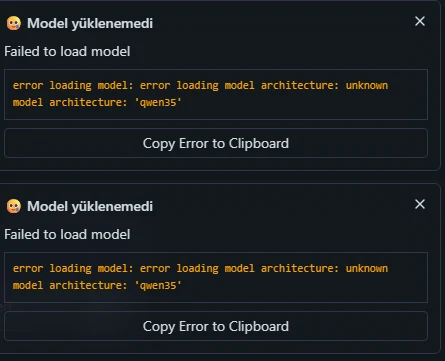
The architecture key inside GGUF does not need to match the marketing name character-for-character. Dense Qwen3.5 files may use qwen35, while Mixture-of-Experts variants can use qwen35moe. The runtime uses this key to choose the correct loader and compute path.
A Qwen3.5-27B file may therefore expose qwen35 while a Qwen3.5-35B-A3B MoE file may expose qwen35moe. In both cases an 'unknown architecture' failure points first to runtime compatibility, not model size.
Current llama.cpp source contains Qwen3.5 architecture constants, so an older packaged runtime can fail even while current upstream source already knows the model.
Memory failures happen after the runtime recognizes the model and starts allocating weights, KV cache or compute buffers. They usually contain messages such as out of memory, failed to allocate or CUDA allocation errors. qwen35 unknown architecture stops earlier in the loader path.
A machine with plenty of RAM and VRAM can still fail if the runtime is too old. After updating, you may then encounter a genuine OOM; that is a second-stage problem and a sign the loader progressed further.
The LM Studio desktop application manages the UI, model catalog, chat and server features. GGUF inference is performed by a llama.cpp Runtime Extension Pack. Updating only one of these layers may leave the other outdated.
Official LM Studio documentation says Ctrl + Shift + R opens runtime management on Windows/Linux, and the CLI exposes lms runtime commands. As of August 15, 2026, LM Studio 0.4.21 is the stable release; its changelog references llama.cpp 2.28.1+ engine settings.
If your app only lists 1.x engines, update the desktop application first, refresh runtimes, then verify the selected GGUF engine.
Deleting a 10-30+ GB model should not be the first response to an architecture error. Re-downloading the same GGUF and loading it through the same old runtime usually reproduces the same failure.
Apply changes one at a time and reload the model after each major step. If the error text changes, diagnose the new message instead of assuming the original problem remains.
'Latest' can mean the newest package exposed by your current application/channel rather than the newest llama.cpp engine available in the modern runtime line. An older app can therefore present v1.104.2 as latest inside its own catalog.
The real screenshot in this guide shows Vulkan, CUDA, CPU and CUDA 12 all at v1.104.2. Switching between those four old builds does not add qwen35 support; update LM Studio, refresh the catalog and select a current 2.x engine.
After installing a new engine, also verify that the GGUF dropdown points to it. Installed and selected are not the same state.
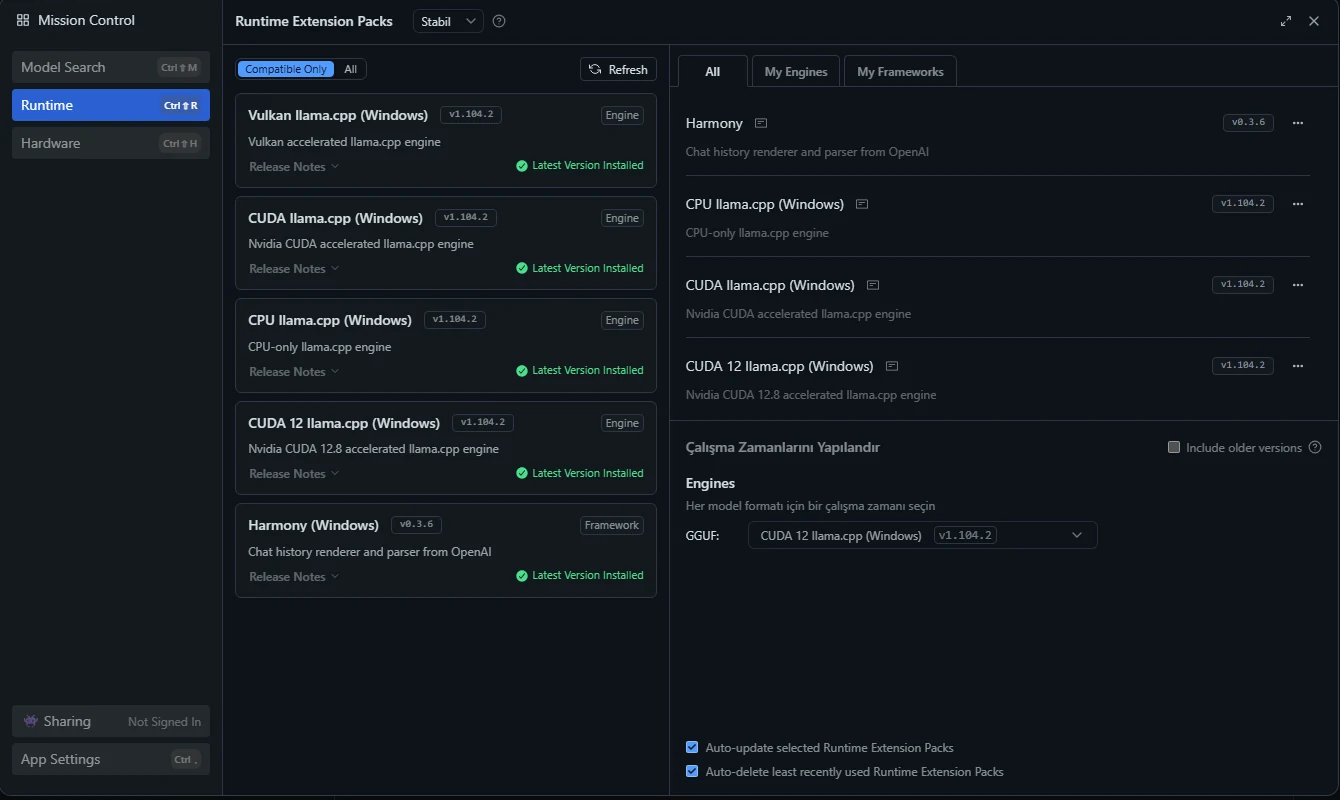
For NVIDIA GPUs, a current CUDA-based llama.cpp engine is normally the first choice. CUDA 12 is appropriate when your driver and card support that runtime. The key requirement for this error is a recent engine with Qwen3.5 architecture support.
Vulkan is useful across AMD/Intel and for broad compatibility. CPU runtime is also valuable as a diagnostic path: if a small Qwen3.5 loads on CPU but a GPU backend fails differently, you have narrowed the problem to the backend/driver/runtime combination.
Choose stability first, performance second.
| Runtime | Best fit | Strength | Check |
|---|---|---|---|
| CUDA llama.cpp | NVIDIA GPU | Native NVIDIA acceleration | Driver, engine version, GPU offload |
| CUDA 12 llama.cpp | Recent NVIDIA systems | Current CUDA line | Driver/runtime compatibility |
| Vulkan llama.cpp | AMD/Intel/broad compatibility | Cross-vendor backend | GPU driver and Vulkan support |
| CPU llama.cpp | No GPU / diagnosis | Removes GPU dependency | Can be slow for large models |
Yes. qwen35moe is associated with Qwen3.5 MoE variants such as 35B-A3B. LM Studio's official bug tracker contains reports where the MoE architecture key was not recognized.
The sparse expert design changes performance and memory behavior later, but an unknown architecture failure happens before those optimizations matter. Update and select a compatible runtime first.
Failed to load model
error loading model: error loading model architecture: unknown model architecture: 'qwen35moe'Verify the active engine, not just the list of installed engines. Multiple runtime versions can coexist. Unload the model, restart LM Studio and reload it under the new engine.
Then test a small Qwen3.5 from a trusted catalog. If a 2B/4B Qwen3.5 loads while one third-party GGUF fails, investigate that file/quantization build. If even the small current model reports qwen35 unknown architecture, the wrong engine is still being used.
Use server logs to confirm the architecture value and selected runtime version.
Quantization changes file size, memory demand and quality. It does not add an architecture implementation to an old runtime. If qwen35 is unknown, switching from Q8 to Q4 does not fix the loader's missing model type.
After architecture support works, quantization becomes relevant to RAM/VRAM fit. Remember that model weights are only part of memory use; KV cache, context, multimodal projectors and runtime buffers add overhead.
Use a smaller Qwen3.5 as a compatibility test before deciding whether your large model needs a lighter quantization.
The official Qwen3.5-27B model card states a default context length of 262,144 tokens and recommends reducing the context window if you encounter OOM. Long context can substantially increase KV-cache memory even when the model weights themselves fit.
For local testing, start with a practical context such as 8K or 16K, verify stability, then raise it only when your workload needs more. GPU offload, quantization and context must be balanced against real VRAM/RAM limits.
An OOM after the qwen35 error disappears is a different problem and often means the runtime now recognizes the model.
This is a different stage. Qwen3.5 can provide multimodal capabilities, but GGUF deployments may require a compatible projector/mmproj file. llama.cpp issue reports show the separate 'image input is not supported' / mmproj error family.
If text chat works, architecture loading succeeded. Check whether the model package includes a projector and whether LM Studio associated it correctly. Use the model card instructions for that exact GGUF build.
Text-only usage may remain available even when the vision projector is missing.
'Failed to load model' is an umbrella message. The next line distinguishes runtime compatibility, memory, file integrity, GPU initialization and multimodal-projector failures.
Search the exact technical line and inspect Developer Logs or lms log stream --source server if the popup is too short.
| Error / symptom | Likely layer | First action | Re-download? |
|---|---|---|---|
| unknown model architecture: 'qwen35' | Old/incompatible runtime | Update app + llama.cpp runtime | Usually no |
| unknown model architecture: 'qwen35moe' | Old/incompatible MoE support | Select current 2.x runtime | Usually no |
| out of memory / failed to allocate | RAM/VRAM/context | Reduce context/offload or quantization | No |
| unexpected EOF / missing tensor | File integrity/build | Verify download/source | Maybe |
| image input is not supported / mmproj | Vision projector | Use matching mmproj/projector | Usually not main model |
| CUDA initialization / driver error | GPU backend | Check driver/runtime | No |
| Loads but extremely slow | Offload/backend/context | Tune GPU offload and context | No |
| Repeated special tokens | Template/runtime regression | Check runtime/template/model card | Usually no |
The official LM Studio CLI can list and update runtimes without opening the UI. Use lms runtime ls, lms runtime update and lms runtime select to verify what is installed and active.
Use lms log stream --source server for loading logs, lms ls for downloaded models and lms ps for models currently in memory. These outputs are useful when reporting a reproducible bug.
Redact private paths or credentials before posting logs publicly.
lms runtime ls
lms runtime update
lms runtime selectlms ls
lms ps
lms log stream --source serverLM Studio lists Qwen3.5 variants including 2B, 4B, 9B, 27B and 35B-A3B. Smaller dense models are convenient for compatibility checks, while larger models demand more memory and may offer stronger quality depending on task and quantization.
After a runtime update, load a small Qwen3.5 first. If it works, then move to 27B or 35B-A3B and solve any capacity errors separately.
For coding, multilingual chat, tool use and document workloads, model size is only one variable; context, quantization and prompt formatting also matter.
Benchmark with the same model, quantization, context and prompt. Increase GPU offload only while leaving enough VRAM headroom for KV cache and runtime buffers.
Avoid unnecessarily huge context windows. Record app version, runtime version, GPU, model file and quantization whenever you compare tokens/s because Qwen3.5 performance can change across llama.cpp engine releases.
Measure time-to-first-token and prompt processing as well as decode tokens/s.
A pure qwen35/qwen35moe architecture message is usually not enough reason to re-download. The loader has already read metadata from the file.
Re-download when file size is wrong, the transfer was interrupted, you see unexpected EOF, missing tensor/header errors or a checksum mismatch. Multi-part GGUFs also require every shard to be present.
If the same file opens in another current llama.cpp-based application, that is useful evidence that the file is readable.
Before a full reinstall, note your model directory and keep the model files. Removing an old runtime and installing a current one is less disruptive than deleting the whole application state.
If you must reinstall, protect chat history, settings and model paths as needed. After reinstalling, test a small Qwen3.5 first and then the large model.
For a bug report, include LM Studio version, OS, GPU, runtime name/version, exact GGUF filename and server logs.
Ctrl + Shift + R ile runtime yönetimi ve GGUF için llama.cpp kullanımı
lmstudio.ai ↗SOURCELM Studio CLI — lms runtimeRuntime listeleme, indirme, seçme ve güncelleme komutları
lmstudio.ai ↗SOURCELM Studio 0.4.21 Changelog12 Ağustos 2026 sürümü ve llama.cpp 2.28.1+ motor notları
lmstudio.ai ↗SOURCELM Studio — Qwen3.5 Model SayfasıQwen3.5 model ailesi, GGUF/MLX seçenekleri ve kabiliyetleri
lmstudio.ai ↗SOURCEQwen — Qwen3.5-27B Model CardResmi model bilgileri ve 262.144 token varsayılan context açıklaması
huggingface.co ↗SOURCEllama.cpp — GGUF Architecture ConstantsGüncel llama.cpp kaynak kodunda Qwen3.5 mimari anahtarları
github.com ↗SOURCELM Studio Bug Tracker #1606Qwen3.5 model yükleme sorununun resmi hata takipçisindeki örneği
github.com ↗SOURCELM Studio Bug Tracker #1587'qwen35moe' unknown model architecture örneği
github.com ↗SOURCEllama.cpp Issue #19903Qwen3.5-35B-A3B qwen35moe yükleme raporu
github.com ↗SOURCELM Studio Docs — lms log streamModel ve sunucu loglarını izlemek için resmi CLI dokümanı
lmstudio.ai ↗SOURCELM Studio System RequirementsWindows için AVX2, RAM ve VRAM önerileri
lmstudio.ai ↗SOURCEUnsloth Qwen3.5-27B Discussion #9Aynı qwen35 hatasının topluluk çözüm örneği
huggingface.co ↗The active llama.cpp runtime does not recognize the qwen35 architecture stored in the Qwen3.5 GGUF metadata. Update LM Studio and the selected runtime.
No. OOM happens after architecture recognition during memory allocation. qwen35 is primarily a loader/runtime compatibility message.
Not for a pure qwen35 error. Update the runtime first. Re-download only when there are file integrity, EOF, header or tensor errors.
It is an architecture key used by Qwen3.5 Mixture-of-Experts variants such as 35B-A3B.
Official LM Studio docs use it to open runtime management on Windows and Linux.
An older application/runtime catalog can mark the newest 1.x package it knows as latest. Update the app and refresh for current 2.x engines.
Start with a current CUDA/CUDA 12 engine on NVIDIA. Vulkan or CPU can be useful for diagnosis.
No. Quantization changes memory/size, not whether an old runtime knows the architecture.
The runtime now gets farther into model loading. Reduce context, offload or model/quantization size.
The official model card states 262,144 tokens and recommends reducing context when OOM occurs.
Vision may require a matching mmproj/projector. This is separate from architecture recognition.
It lists installed LM Studio inference runtimes from the CLI.
Use lms log stream --source server or Developer Logs.
As of the August 15, 2026 review, the official stable changelog lists LM Studio 0.4.21.
Yes. It is a sparse Mixture-of-Experts variant and may expose qwen35moe metadata.
A 2B/4B model quickly verifies architecture support before you troubleshoot large-model memory capacity.
No. The architecture lives in GGUF metadata, not the filename.
Yes. Unload/eject and reload it so the new engine is definitely used.
The file is likely readable; verify LM Studio's active runtime and application version.
No. Read the technical line underneath it; architecture, memory, CUDA, tensor and mmproj errors require different fixes.
It is a multilingual model family; real quality depends on model size, quantization, prompt and task.
Yes. The family targets reasoning, tool use and coding-related workloads, with local performance depending on the chosen model and hardware.
Running Qwen, Llama, Gemma and similar models on Windows or Linux benefits from high RAM capacity, fast NVMe storage and suitable GPU resources. Explore Eka Sunucu GPU servers and VPS options for development and inference workloads.