 Turkey (Turkish)
 Germany (German)
 Worldwide (English)


Compare WordPress core files with a clean same-version copy or checksums.

 Halkali merkez neighborhood fatih st ozgur apt no 46 , Kucukcekmece , Istanbul , 34303 , TR
Clean a Hacked WordPress Site: Files, Database and Hardening with current, technical and vendor-neutral guidance.
The safest approach is to classify the loss or security condition, preserve the current state and apply verifiable methods in order. No single tool or setting produces the same result in every scenario.
Deleting the site immediately can destroy evidence and the initial-entry clue. Keep a pre-clean file and database copy in quarantine.
Compare WordPress core files with a clean same-version copy or checksums.
Inspect unexpected PHP or executable files under wp-content/uploads.
Deleting the site immediately can destroy evidence and the initial-entry clue. Inspect unexpected PHP or executable files under wp-content/uploads.
Keep a pre-clean file and database copy in quarantine. Compare WordPress core files with a clean same-version copy or checksums.
Compare WordPress core files with a clean same-version copy or checksums. Inspect unexpected PHP or executable files under wp-content/uploads.
Remove unused themes and plugins from untrusted sources.
Verify administrators, email addresses and recently created accounts.
Compare WordPress core files with a clean same-version copy or checksums. Verify administrators, email addresses and recently created accounts.
Inspect unexpected PHP or executable files under wp-content/uploads. Remove unused themes and plugins from untrusted sources.
Remove unused themes and plugins from untrusted sources. Verify administrators, email addresses and recently created accounts.
Search autoloaded options, redirects and suspicious scripts in the database.
Review both WordPress cron and operating-system cron jobs.
Remove unused themes and plugins from untrusted sources. Review both WordPress cron and operating-system cron jobs.
Verify administrators, email addresses and recently created accounts. Search autoloaded options, redirects and suspicious scripts in the database.
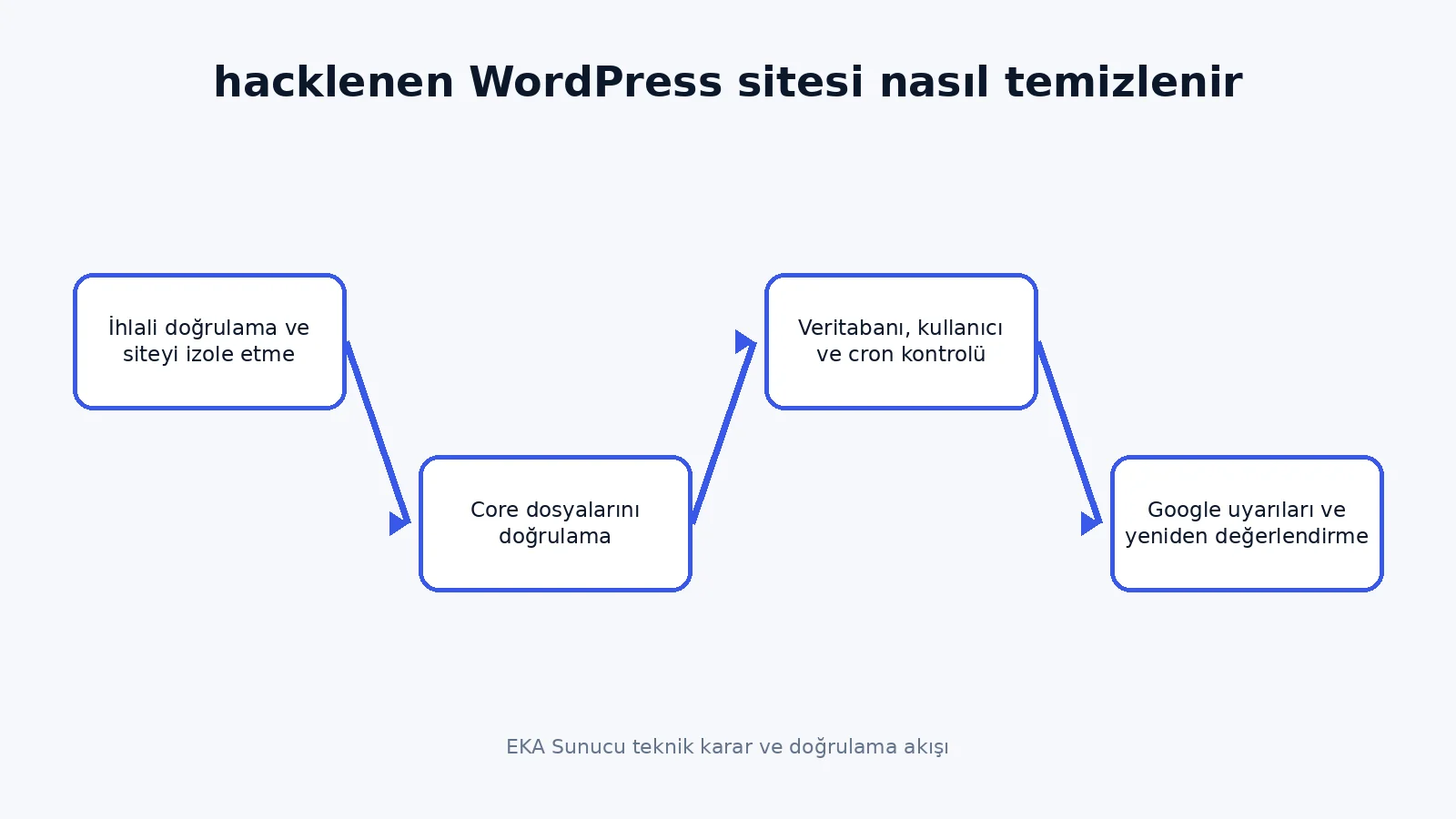
Search autoloaded options, redirects and suspicious scripts in the database. Review both WordPress cron and operating-system cron jobs.
Rotate dashboard, hosting, SFTP, database and email credentials separately.
Removing files without closing the original vulnerability does not prevent reinfection.
Search autoloaded options, redirects and suspicious scripts in the database. Removing files without closing the original vulnerability does not prevent reinfection.
Review both WordPress cron and operating-system cron jobs. Rotate dashboard, hosting, SFTP, database and email credentials separately.
Rotate dashboard, hosting, SFTP, database and email credentials separately. Removing files without closing the original vulnerability does not prevent reinfection.
Deleting the site immediately can destroy evidence and the initial-entry clue.
Keep a pre-clean file and database copy in quarantine.
Rotate dashboard, hosting, SFTP, database and email credentials separately. Keep a pre-clean file and database copy in quarantine.
Removing files without closing the original vulnerability does not prevent reinfection. Deleting the site immediately can destroy evidence and the initial-entry clue.
Deleting the site immediately can destroy evidence and the initial-entry clue. Keep a pre-clean file and database copy in quarantine.
Compare WordPress core files with a clean same-version copy or checksums.
Inspect unexpected PHP or executable files under wp-content/uploads.
Deleting the site immediately can destroy evidence and the initial-entry clue. Inspect unexpected PHP or executable files under wp-content/uploads.
Keep a pre-clean file and database copy in quarantine. Compare WordPress core files with a clean same-version copy or checksums.
Compare WordPress core files with a clean same-version copy or checksums. Inspect unexpected PHP or executable files under wp-content/uploads.
Remove unused themes and plugins from untrusted sources.
Verify administrators, email addresses and recently created accounts.
Compare WordPress core files with a clean same-version copy or checksums. Verify administrators, email addresses and recently created accounts.
Inspect unexpected PHP or executable files under wp-content/uploads. Remove unused themes and plugins from untrusted sources.
Remove unused themes and plugins from untrusted sources. Verify administrators, email addresses and recently created accounts.
Search autoloaded options, redirects and suspicious scripts in the database.
Review both WordPress cron and operating-system cron jobs.
Remove unused themes and plugins from untrusted sources. Review both WordPress cron and operating-system cron jobs.
Verify administrators, email addresses and recently created accounts. Search autoloaded options, redirects and suspicious scripts in the database.
No. Results depend on the device, backup, file system and actions taken after the incident. A guaranteed success claim is not technically credible.
Preserve the current state, stop unnecessary writes or changes, record dates and confirm a rollback route.
Free methods can diagnose and solve basic cases. Decide using data value, privacy and rollback risk rather than price alone.
An incorrect restore, reset or write to the source can replace current data. Confirm the target and rollback effect before every step.
Time ranges from minutes to days depending on data volume, connectivity, hardware health and verification depth.
Use professional assessment for physical failure, business records, legal evidence, encryption or a single remaining copy.
The page was technically reviewed on 12 August 2026 against official documentation and current practice. Recheck sources after major version changes.
A backup provides rollback, version comparison and shorter recovery time in addition to basic recovery.
Send your server, backup, security or custom configuration requirements through our existing contact page.