 Türkei (Türkisch)
 Germany (German)
 Worldwide (English)



Problem Description:
When you submit your sitemap (e.g., sitemap.xml) to Bing Webmaster Tools, you might receive an error like "Couldn't fetch" or "Sitemap inaccessible." This means Bingbot is unable to retrieve the sitemap, which may prevent your site from being properly indexed.
Common Causes:
1. mod_security Restrictions
On many Apache servers, mod_security (a web application firewall) may block automated access to sitemap.xml, mistaking it for a suspicious request.
2. Permission Issues / Access Denied
-
Incorrect file permissions or restrictive
.htaccessrules may prevent Bingbot from accessing your sitemap. -
A misconfigured
robots.txtfile could be disallowing access to the sitemap or entire directories.
3. HTTPS Redirection Issues
Improperly set up HTTPS redirects (especially infinite redirect loops) can prevent Bing from successfully reaching the file.
4. Temporary Server Downtime
If Bingbot tries to access your site while it's temporarily down, the sitemap fetch will fail.
Solution: Disable mod_security in cPanel
Step-by-Step:
1. Log into cPanel
Access your hosting account’s cPanel.
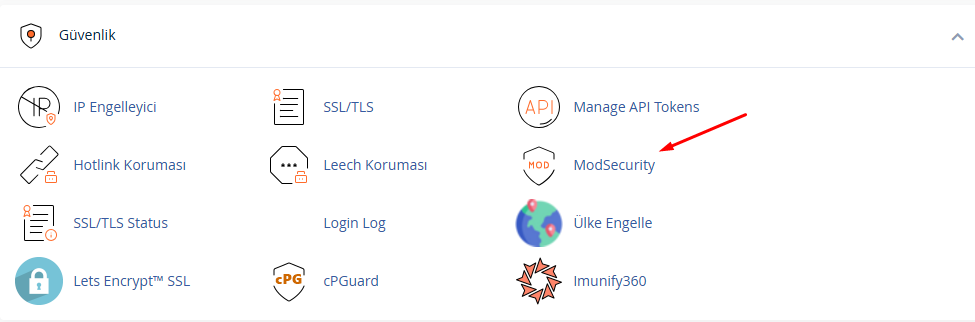
2. Search for “ModSecurity”
Use the search bar and type modsecurity. Click on the “ModSecurity” icon that appears.
3. Disable for Specific Domain
You’ll see a list of domains hosted on your account. Click “Disable” next to the domain for which Bing is having issues. This turns off mod_security rules for that domain.
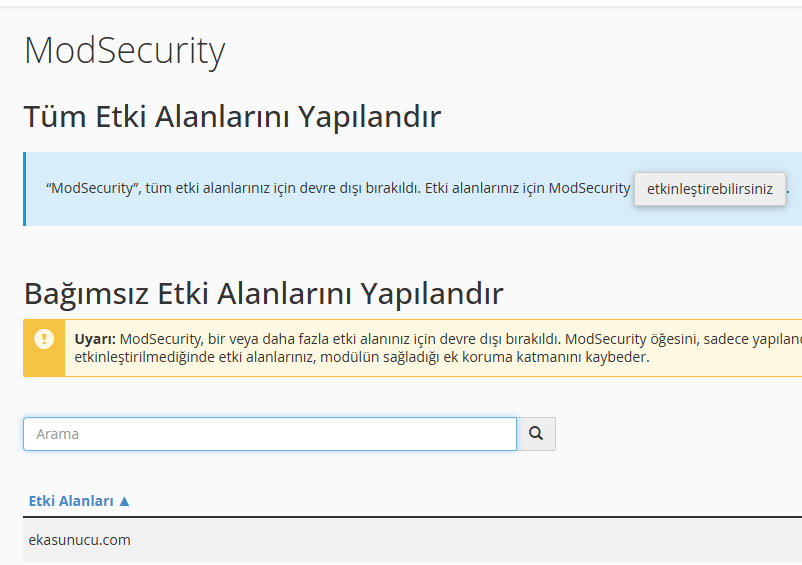
Note: Disabling mod_security removes some protection from your website. For better security, you can disable only specific rules if you have access to Apache configuration.
Additional Checks:
1. Test Sitemap Access Manually
Open https://yourdomain.com/sitemap.xml in your browser. If it works for you but not for Bing, then mod_security or a firewall might be the cause.
2. robots.txt File
Check if the following line exists in your robots.txt:
If so, remove it. Also, make sure your sitemap is properly declared:
3. Firewall or Security Systems
Systems like Cloudflare, Imunify360, or server-level firewalls might block Bingbot. Review your security logs or temporarily whitelist Bingbot's IP.
Conclusion:
The most common reason Bing cannot access your sitemap is server-level security filters like mod_security. Disabling this module (or certain rules) usually resolves the issue. Still, it’s important to double-check file permissions, HTTPS redirection, and robots.txt to rule out other causes.